
ネイティブ監査
- 特定のメールボックスの監査を有効にするには、Exchange Management Shell で次のコマンドを実行します:
Set-Mailbox –Identity "TestUser" -AuditEnabled $true
- すべてのメールボックスを監査するには、次を入力します:
$UserMailboxes = Get-mailbox -Filter {(RecipientTypeDetails -eq 'UserMailbox')} $UserMailboxes | ForEach {Set-Mailbox $_.Identity -AuditEnabled $true}
- どのメールボックスでメールボックス監査が有効になっているかを確認するには、次のコマンドを実行します:
Get-Mailbox | FL Name,AuditEnabled
- 監査ログのエントリを取得するには、次のコマンドを実行します:
Search-MailboxAuditLog -Identity "TestUser" -LogonTypes Admin,Delegate -ShowDetails -StartDate 1/1/2014 -EndDate 12/31/
- メールボックス監査ログのエントリを指定したメールボックスに送信するには、次のコマンドを実行します:
New-MailboxAuditLogSearch "smtp.server.name" -Mailboxes "TestUser","TestUser1" -LogonTypes Admin,Delegate -StartDate 1/1/2014 -EndDate 12/31/2014 –ShowDetails -StatusMailRecipients auditors@test.local
レポート例:
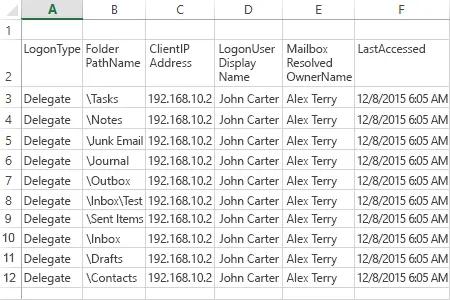
Netwrix Auditor for Exchange
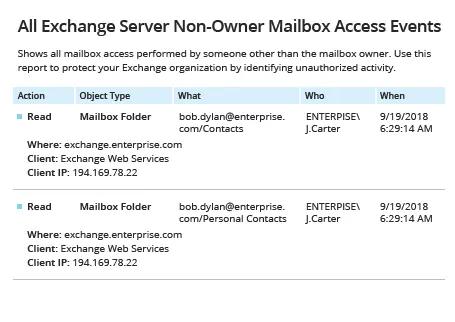
- Netwrix Auditor を実行 →「Reports」へ移動 →「Exchange」セクションを展開 →「All Exchange Server Non-Owner Mailbox Access Events」を選択 →「View」をクリックします。
- レポートを保存するには、「Export」ボタンをクリック → ドロップダウン メニューから形式を選択 →「Save」をクリックします。
共有する