
How Can You Hold Privileged Users Accountable for Their Actions?
Jan 15, 2020
Controlling privileged users is challenging because shared accounts obscure accountability and increase the risk of data breaches or downtime. Integrating Netwrix Auditor with the CyberArk Privileged Access Security Solution ties actions to individual identities, capturing video and keystroke-level activity. This visibility enables organizations to detect suspicious behavior, resolve access issues, and prove compliance, ensuring privileged users remain accountable for their actions.
Why is it difficult to control the activity of privileged users?
In a recent survey, 34% of respondents admitted to sharing passwords or accounts with their coworkers. Sharing credentials is a potentially risky activity, which may result in data breaches and system downtime. These risks are dramatically higher when the accounts involved are privileged accounts, since they have far greater access to sensitive data and business-critical systems. You need to know for certain who is using the powerful accounts controlled by your privileged access management (PAM) solution and exactly what each individual is doing with the elevated permissions.
How can Netwrix Auditor help?
By integrating Netwrix Auditor and the CyberArk Privileged Access Security Solution, you can keep privileged users from hiding behind shared accounts and spot suspicious activity in time to prevent real damage. Specifically, you can:
- Keep a close eye on privileged users.
Remain confident that privileged users are following internal policies and don’t misuse their elevated permissions by auditing each action in the CyberArk solution. For example, you can know which employee used the credentials for the production server and gather both video and keystroke level recordings of that user’s exact actions with the CyberArk privileged session management capabilities
- Quickly spot and investigate misbehavior by privileged users.
Promptly detect unusual activity so you can respond before it leads to a security incident or system downtime. With all security intelligence tied to the individuals responsible, you can easily uncover rogue insiders using privileged accounts, instead of having to painstakingly piece together complicated patterns of privilege abuse.
- Resolve user issues before they become real problems.
Monitor all privileged account activity in CyberArk to limit risky actions and business disruptions caused by users’ inability to access required resources.
- Prove compliance with less effort.
Organize all audit data from different systems in a single searchable display and store data for as long as needed and sort through it quickly whenever auditors request specific information.
How does it work?
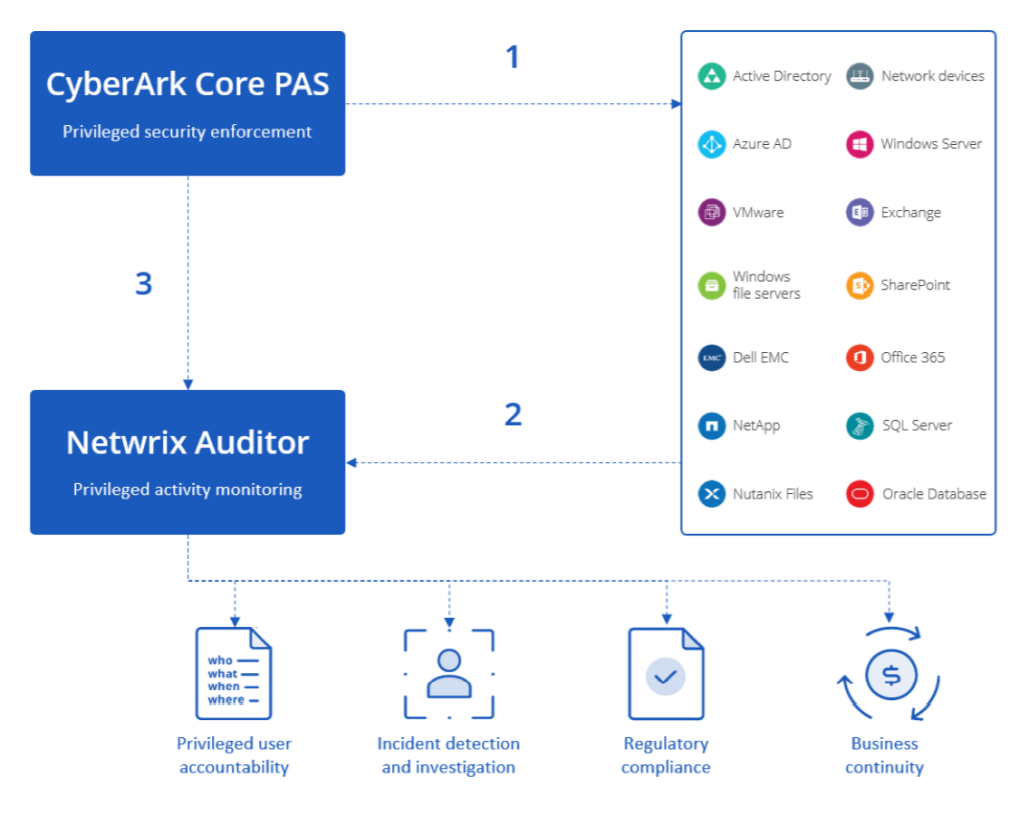
- Privileged users perform actions using credentials generated by CyberArk
- Netwrix Auditor continuously monitors the IT ecosystem for suspicious activity and alerts you to critical events. With the integration, this auditing includes collecting data from the CyberArk Privileged Access Security Solution.
- Netwrix Auditor collects data from CyberArk to unveil the individual identities using shared accounts, enabling full accountability of privileged users.
Key Takeways
Combining CyberArk’s expertise in securing privileged access with Netwrix’s prowess in data-centric security yields a solution that not only secures privileged credentials, but also enables organizations to ensure that powerful rights are not abused. With the full context around the activity of privileged users, you will be able to detect and investigate security incidents before they lead to a breach or compliance failure, or bring your business to a halt.
To learn more about this integration, please visit either Netwrix Add-on Store or the CyberArk Marketplace.
Share on
Learn More
About the author

Jeff Melnick
Director of Systems Engineering
Jeff is a former Director of Global Solutions Engineering at Netwrix. He is a long-time Netwrix blogger, speaker, and presenter. In the Netwrix blog, Jeff shares lifehacks, tips and tricks that can dramatically improve your system administration experience.
Learn more on this subject
Using Windows Defender Credential Guard to Protect Privileged Credentials
What is Microsoft LAPS: How Can You Enhance Its Security?
RBAC vs ABAC: Which One to Choose?
Steps to Control Local Admin Rights
Top 11 Identity and Access Management (IAM) Solutions for Your Enterprise