
PingCastle vs. BloodHound: AD Attack Path Analysis
Sep 2, 2026
One weak setting or an unnoticed privilege chain can hand an attacker a route to full domain control. Configuration assessment and attack path analysis close that exposure from different angles: one scores misconfigurations and returns a ranked list of fixes, while the other maps how existing permissions chain to privileged accounts. The right choice depends on analysis depth, deployment effort, and fit within a continuous identity program.
According to the Netwrix 2026 Data and Identity Security Report, 75% of sensitive data exposures begin with compromised identities or misconfigured permissions.
Active Directory sits at the center of that exposure: the joint advisory from the National Security Agency (NSA), the Cybersecurity and Infrastructure Security Agency (CISA), and Australian, New Zealand, Canadian, and UK cyber agencies calls AD's attack surface "exceptionally large and difficult to defend against."
That warning shapes nearly every PingCastle vs. BloodHound evaluation. The two tools answer different questions about the same Active Directory environment.
PingCastle asks where the configuration is weak, while BloodHound asks how an attacker would chain existing privileges to reach Domain Admin.
This comparison weighs both on configuration assessment depth, attack path analysis, deployment effort, and continuous management.
Netwrix PingCastle vs. BloodHound at a glance
Dimension | Netwrix PingCastle | BloodHound |
|---|---|---|
|
Primary focus |
AD security assessment and configuration risk scoring |
AD and Microsoft Entra ID attack path graphing and attack path management |
|
Core problem addressed |
Misconfigurations, outdated objects, insecure policies, privilege sprawl |
Chained permissions and relationships that form exploitable attack paths |
|
Output style |
HTML reports and risk scorecards: Domain Risk Score, Maturity Assessment, Global Risk Score |
Attack path graphs and pre-built queries showing routes to privileged groups; Enterprise adds historical tracking |
|
Attack path analysis depth |
Flags access control list (ACL) vulnerabilities, Kerberos delegation misconfigurations, and privileged-account risks; full path graphs require a graphing platform |
Models chained abuses, nested groups, and lateral movement at every tier |
|
Ease of setup |
Single offline executable that delivers a scored report within minutes, at every tier |
Community Edition requires collectors, a graph database, and tuning; Enterprise is SaaS |
|
Continuous monitoring |
Community Edition runs on demand; Netwrix identity security posture management adds ongoing risk scoring across AD and Entra ID |
Community Edition runs on demand; Enterprise adds continuous attack path management |
|
Deployment model and licensing |
Offline, single executable; Community Edition is free for personal use, and commercial use requires a Service Provider or Enterprise license |
Community Edition is self-hosted, Docker-based, and free; Enterprise is SaaS |
|
Best for |
Admins needing fast, scored AD health checks or a supported assessment program with AD and Entra ID context |
Security teams that need deep attack path analysis and ongoing path management |
Why buyers compare PingCastle and BloodHound
Government guidance recommends the two tools in the same sentence, yet they answer adjacent questions, so most serious AD hardening evaluations end up scoping them together.
Joint government guidance recommends both tools
The 2024 joint advisory from NSA, CISA, and Australian, New Zealand, Canadian, and UK cyber agencies on detecting and mitigating AD compromises explicitly recommends BloodHound, Netwrix PingCastle, and Purple Knight together. It describes BloodHound for graphical attack path visualization, Netwrix PingCastle for security reporting, and Purple Knight for environment security assessment. That single recommendation puts the two tools side by side in almost every serious AD hardening evaluation.
Native Microsoft tooling still leaves exposure gaps
Native Microsoft coverage is improving, yet buyers still find open questions around hybrid exposure. Microsoft Defender for Identity adds posture assessments, but its hybrid recommendations require a sensor on servers running Microsoft Entra Connect.
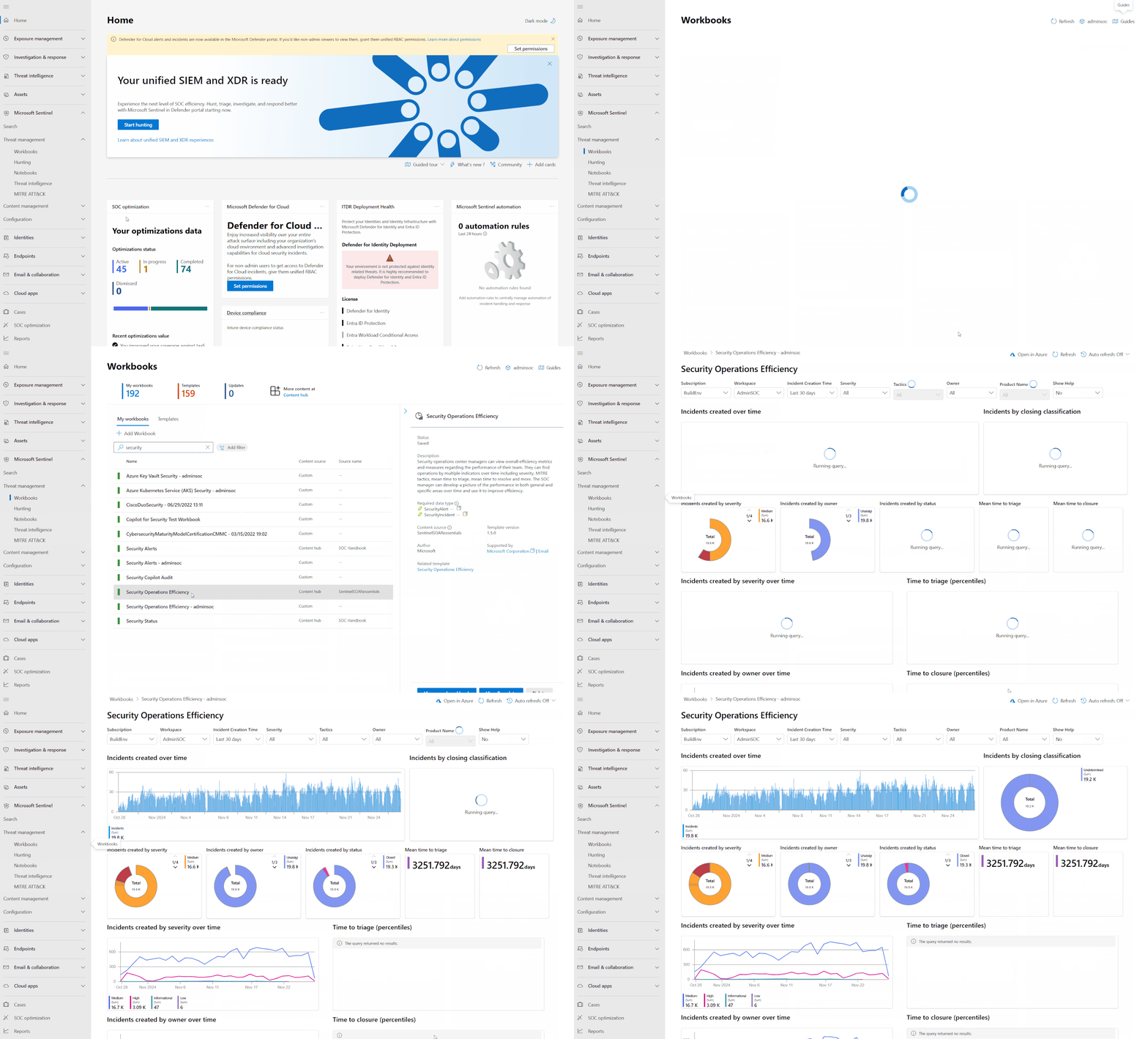
Source: learn.microsoft.com. Microsoft Sentinel's identity attack graph remains in preview.
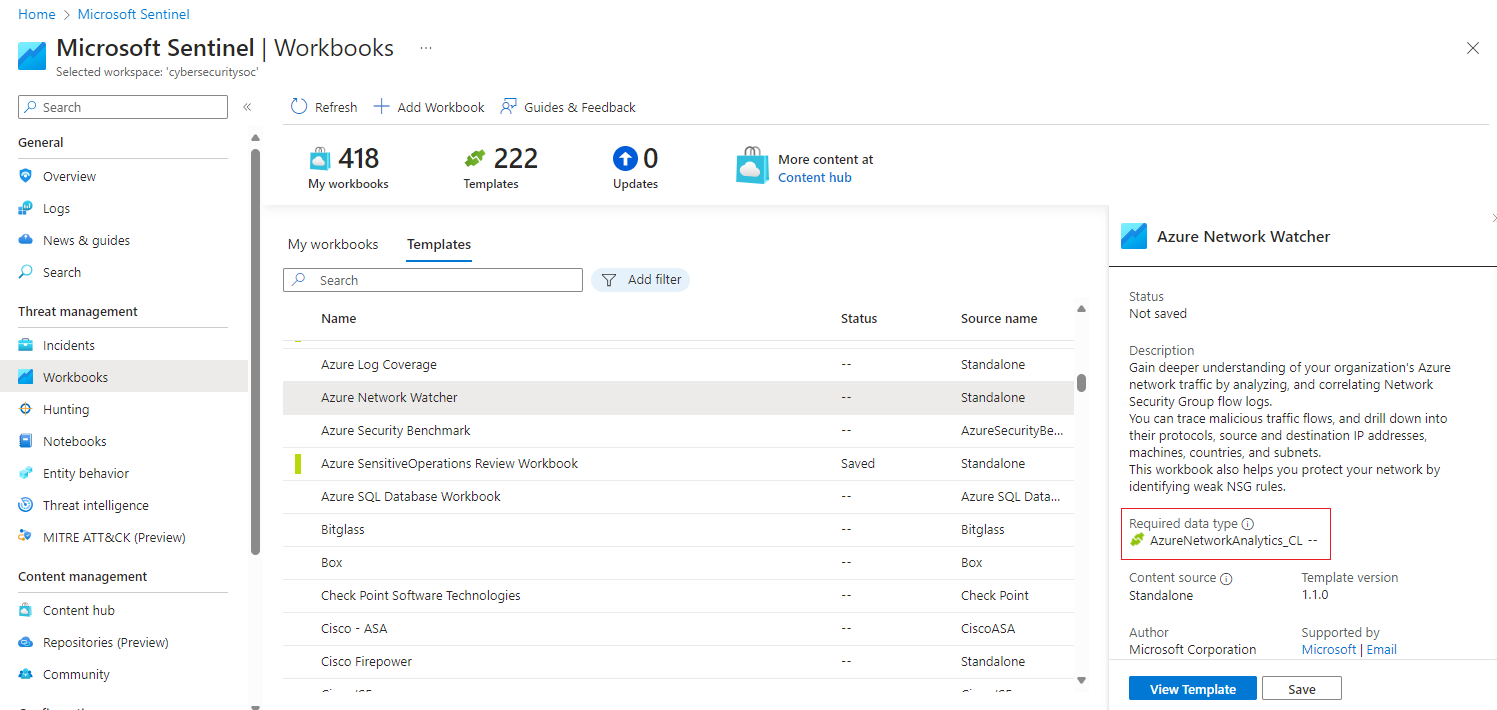
Source: techcommunity.microsoft.com
For teams that need continuous identity context beyond point scans, Netwrix PingCastle assesses AD security risk, while identity security posture management connects identity risk across AD and Microsoft Entra ID.
Configuration risk and attack path risk are different questions
Buyers often realize these tools solve adjacent problems only after they compare feature lists side by side. One tool scores individual objects and Group Policy settings against known-bad configurations. The other chains relationships into multi-hop routes that a per-object scan rarely surfaces on its own.
Hybrid AD and Entra ID environments raise the stakes
As on-premises AD and Entra ID blend, the cost of an unnoticed misconfiguration or an unmapped escalation path grows. According to the Netwrix 2025 Cybersecurity Trends Report, 77% of organizations operate in a hybrid IT environment, making exposure to AD and Entra ID a mainstream operational reality.
Sync components such as Entra Connect, Password Hash Sync, and Active Directory Federation Services (AD FS) create persistent trust bridges that attackers use to pivot between environments.
Service principal abuse, where an application identity receives excessive permissions, Golden SAML, where forged SAML assertions grant cloud access, and SyncJacking, where attackers abuse directory synchronization paths, all cross the on-prem-to-cloud boundary.
Many of these identities are non-human, and they rarely receive the same scrutiny as user accounts: the Netwrix 2026 Data and Identity Security Report found that 76% of organizations don't fully govern non-human identities.
PingCastle's ownership and roadmap have changed
Netwrix acquired PingCastle in August 2024. Since then, the evaluation context has shifted: PingCastle remains an AD security assessment tool, and Netwrix identity security posture management pairs PingCastle with Netwrix 1Secure™ to connect AD and Entra ID risk. Buyers researching today should reassess older "use both" advice in light of the current PingCastle roadmap.
Netwrix PingCastle: AD configuration and health assessment
Netwrix PingCastle is an Active Directory security assessment tool that scans AD for misconfigurations, outdated objects, insecure policies, and privilege sprawl. It runs as a single, offline .NET 8 executable, with a free Community Edition and paid Service Providers and Enterprise tiers.
Each scan returns a Domain Risk Score from 0 to 100, reflecting the highest-risk finding across privileged accounts, trusts, stale objects, and security anomalies.
Checks cover stale accounts, obsolete operating systems, password policy weaknesses, Kerberos delegation misconfigurations, ACL vulnerabilities, and known threats such as MS17-010 and Kerberoastable accounts, each paired with remediation steps in the HTML report.
What stands out:
- Automated AD scans detect vulnerabilities, misconfigurations, and risky settings attackers could exploit.
- Detailed HTML reports and scorecards summarize AD health and track posture over time.
- Risk scoring and prioritization focus admins on the most critical issues first.
- ACL vulnerability and Kerberos delegation checks flag over-provisioning before it feeds an attack path.
- Offline, single-file execution requires no outbound traffic, which matters in regulated or air-gapped networks, and reports support RSA encryption for transfer.
- Within a Netwrix identity security posture program, 1Secure adds ongoing risk scoring across AD and Entra ID, posture trends, and risk-ranked remediation.
What to consider:
- PingCastle prioritizes configuration and health, so teams that need full graph paths may require complementary analysis.
- Community Edition permits personal use only; commercial assessments require Service Provider or Enterprise licensing.
- Broader identity governance and data-layer security require additional tools, so buyers should plan their architecture.
Best for: AD and Entra ID admins who need fast, scored configuration-risk assessments.
BloodHound: AD and Entra ID attack path analysis platform
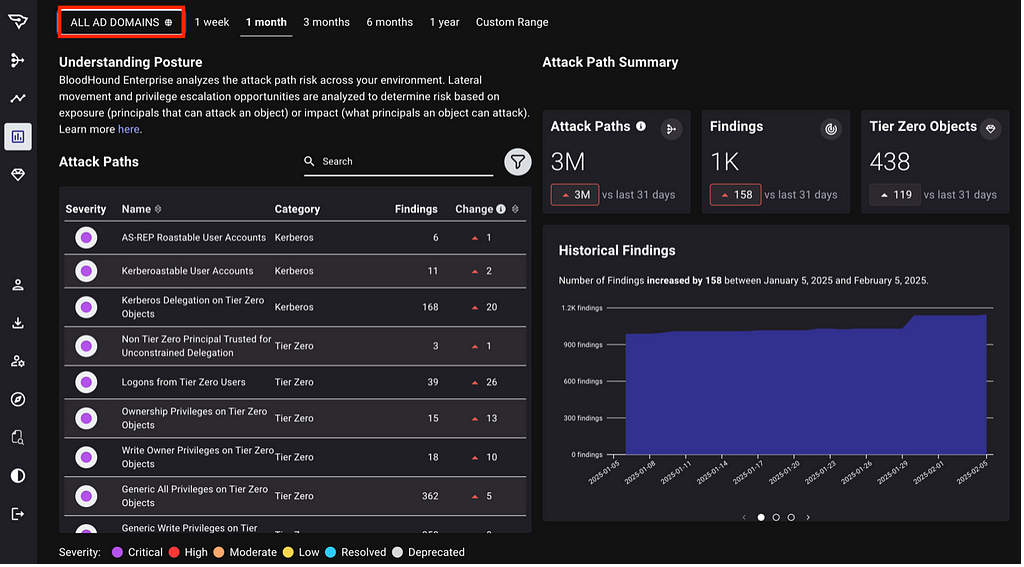
BloodHound builds a graph model of identities, groups, sessions, and permissions across AD and Entra ID to show concrete routes an attacker could use to reach Domain Admin or other Tier Zero assets, meaning identity systems where compromise grants control of the environment.
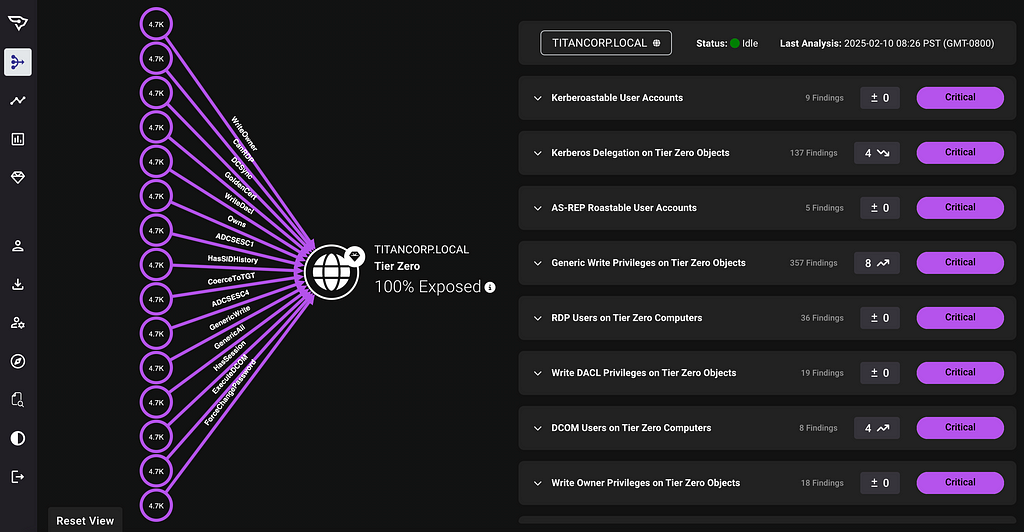
Source: posts.specterops.io
The mechanism is graph theory: users, computers, groups, and permissions become nodes, and the relationships among them become edges that pathfinding can traverse to enable lateral movement or privilege escalation. BloodHound also derives composite edges, such as DCSync and ADCSESC1, by combining several relationships into a single actionable path that per-object configuration scanning rarely surfaces.
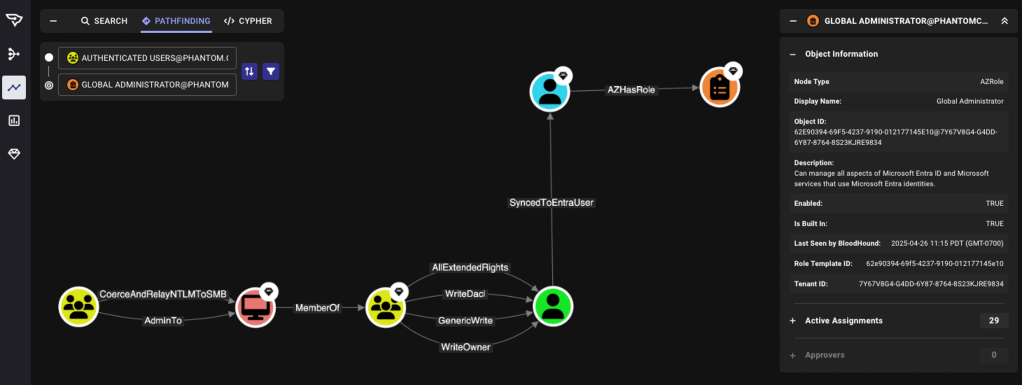
Source: specterops.io
What stands out:
- SharpHound and AzureHound collectors gather AD and Entra ID relationships and permissions to build the attack graph.
- A graph view visualizes privilege paths, highlighting routes to Domain Admins and other Tier Zero assets.
- Curated Cypher queries identify shortest paths, choke points, and high-risk configurations.
- Hybrid attack paths are automatically generated when collectors gather synced Entra ID and AD data.
- Attack path management workflows support prioritizing and remediating high-impact paths.
- Community Edition is free, self-hosted, and Docker-based; Enterprise is SaaS with historical tracking and vendor support.
What to consider:
- Community Edition requires collectors, PostgreSQL, Neo4j, and tuning, so lean teams face higher overhead during pilots.
- Smaller AD environments may gain enough value from simpler assessments before adopting graph operations as a practice.
- SpecterOps designed the Community Edition for point-in-time use, so continuous governance requires an Enterprise evaluation path.
- Buyers should validate the total operating cost during procurement planning and approval.
Together, these graph outputs help security teams prioritize the paths that expose the most privilege.
Best for: Security teams that need deep AD and Entra ID attack-path analysis.
Netwrix PingCastle vs. BloodHound: head-to-head comparison
Configuration health and attack path analysis answer different operational questions. The comparison below shows where each tool excels, has limits, or is absent.
Configuration risk vs. attack path risk
Netwrix PingCastle concentrates on configuration health: outdated objects, insecure policies, misconfigurations, and over-provisioning, delivered as scorecards with remediation guidance. BloodHound models attack paths by graphing relationships and permissions to show how those weaknesses chain into privilege-escalation routes.
For "where is my AD configuration weak?" PingCastle is the more direct answer. For "how would an attacker actually move through my environment?" BloodHound is the answer.
Netwrix PingCastle finds and scores the underlying vulnerabilities; BloodHound shows how they chain together. Netwrix identity security posture management operationalizes the assessment side with ongoing risk scoring and remediation prioritization across AD and Entra ID.
Ease of deployment and time to value
Netwrix PingCastle is a single offline executable that delivers a scored report at every tier within minutes of running. That speed-to-value matters for lean teams that need a practical starting point without database infrastructure. BloodHound Community Edition requires collectors, a graph database, and tuning before it produces usable output. BloodHound Enterprise removes local infrastructure but adds a SaaS onboarding process.
For fast initial AD health checks, Netwrix PingCastle wins; for in-depth attack path analysis, BloodHound wins despite the heavier setup.
Depth of analysis and remediation planning
Netwrix PingCastle's analysis is broad across configuration and policy; fixing its findings often closes many routes before they become usable attack paths. BloodHound's analysis is deep on path mechanics, chained abuses, nested groups, and lateral movement, with emphasis on path relationships. PingCastle covers broader configuration issues outside those paths.
Netwrix PingCastle's remediation guidance can close off many attack paths at the source, and ongoing posture tracking through 1Secure turns that remediation into a repeatable program.
Point-in-time scan vs. continuous monitoring
Both tools' free and Community editions typically run on demand, which makes them valuable for periodic review. BloodHound Enterprise adds continuous attack path management as a paid SaaS tier, while Netwrix identity security posture management adds ongoing identity risk scoring across AD and Entra ID with posture trends over time.
Both free tiers require manual runs, and the Enterprise path in each category is the paid route to continuous coverage.
How to choose between PingCastle and BloodHound
Both tools address the same AD exposure problem from opposite ends, so the choice typically depends on which question you need answered first.
Choose PingCastle if:
- The immediate task is a scored AD configuration baseline with ranked remediation steps.
- The team needs value in minutes from a single offline executable, without standing up database infrastructure.
- The environment is regulated or air-gapped, and outbound traffic is a concern.
Choose BloodHound if:
- The pressing risk is chained privileges: nested groups, delegated rights, and lateral movement routes toward Tier Zero assets.
- The team has the operational capacity to run collectors and a graph database, or the budget for Enterprise SaaS.
- Attack path management needs to become an ongoing practice, not a one-time audit.
The tie usually comes down to two questions: do you need findings scored or paths mapped first, and how much deployment overhead can the team absorb? A lean mid-market team without dedicated container infrastructure will immediately feel the gap.
Identity programs rarely stop at assessment. Attack path reduction often leads to privilege governance, privileged access management, short-lived just-in-time (JIT) credentials, access certification, and access-review work handled by broader identity governance tools.
Eastern Carver County Schools shows what that next step looks like: the district eliminated standing admin access to systems that hold data for 9,300 students by moving to just-in-time privileges with Netwrix Privilege Secure and completed the rollout in days.
Existing PingCastle customers can extend assessment into that wider program with continuous AD monitoring, Identity Threat Detection and Response (ITDR), and AD recovery.
Request a demo to see how PingCastle and Netwrix 1Secure connect AD and Entra ID risk data into a single identity security posture view.
Disclaimer: The information in this article was verified as of July 2026. Product capabilities, roadmaps, and pricing may change; verify directly with each vendor before procurement.
Frequently asked questions about PingCastle vs. BloodHound
Share on
Learn More
About the author

Netwrix Team
Learn more on this subject
ESC8 is still the most common AD CS finding we see
Microsoft RAMP stops at the edge of your certificate authority
Business email compromise: How AI changes BEC attacks and how to prevent them
You only need AI tokens to become a hacker
What is remote code execution (RCE)? How AI speeds up exploitation and how to limit the damage