
Kerberos デリゲーションの目的
Kerberos デリゲーションは長い間使われてきました(正確には Windows Server 2000 からです)。しかし多くの場合、Active Directory を扱うエンジニアは、Kerberos デリゲーションのさまざまな実装方法、その用途、そして悪用され得る方法をすべて把握しているわけではありません。中には Kerberos デリゲーションを委任された権限と混同してしまう人もいます。
Kerberos の委任を実際に利用する目的は、アプリケーションが別のサーバーでホストされているリソースにアクセスできるようにすることです。たとえば、Web サーバーのようなアプリケーションが、SQL データベースなど、別の場所にホストされている Web サイトのリソースにアクセスする必要がある場合があります。Web サーバーを実行しているサービス アカウントにデータベースへのアクセスを直接付与する代わりに、そのサービス アカウントを SQL サーバー サービスに委任するように許可できます。ユーザーが Web サイトにログインすると、サービス アカウントはそのユーザーの代わりに SQL サーバー サービスへのアクセスを要求します。これにより、ユーザーは Web サーバーのサービス アカウント自体に対するアクセス権を新たに付与することなく、自分にプロビジョニングされたデータベース内のコンテンツにアクセスできます。
Kerberos の委任の種類
長年にわたり、Kerberos の委任にはいくつかの種類が進化してきました。Windows Server 2000 の元の実装は、無制限の委任(unconstrained delegation)です。それ以来、セキュリティを改善する、より厳格な委任のバージョンが登場しています。具体的には、制限付き委任(constrained delegation)と、リソースベースの制限付き委任(resource-based constrained delegation)です。以下で、各種類の委任について詳しく掘り下げます。
コンピューターまたはユーザー アカウントで委任を構成するには、以下のように Active Directory Users and Computers の Delegation タブを使用します。ユーザー アカウントには servicePrincipalName (SPN) が設定されている必要があることに注意してください。
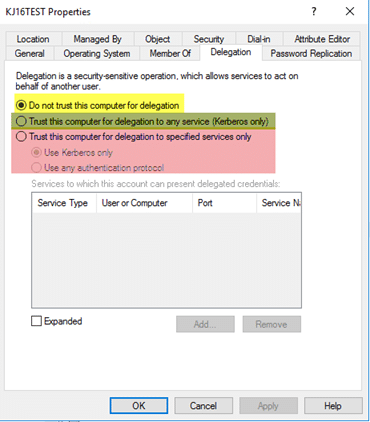
図1. Active Directory Users and Computers の「委任(Delegation)」タブ
最初の選択肢(黄色)は、アカウントを設定して、委任(delegation)のために信頼されないようにすることを可能にします。これは、委任に絶対に使用してはいけない機密性の高いアカウントや管理用アカウントに最もよく使われます。2つ目の選択肢(緑)は、アカウントを無制約の委任(unconstrained delegation)用に設定することを可能にします。3つ目の選択肢(赤)は、アカウントを制約付きの委任(constrained delegation)用に設定することを可能にします。
無制約の委任(Unconstrained Delegation)
これは委任(delegation)の元になった実装であり、同時に最も安全性が低いものです。では、無制約の委任(unconstrained delegation)とは実際に何をするのでしょうか?裏側では、無制約の委任が設定されると、そのオブジェクトの userAccountControl 属性が更新され、「TRUSTED_FOR_DELEGATION」フラグが含まれるようになります。無制約の委任が設定されたホストに対してオブジェクトが認証すると、そのアカウントのチケット付与チケット(ticket-granting ticket:TGT)がメモリに保存されます。これにより、必要に応じて、無制約の委任が設定されたホストが後からそのユーザーになりすますことが可能になります。
例えば、特権アカウントが無制約の委任が設定されたホストに認証するような状況を想像してみてください。そのアカウントは、特権ユーザーとしてドメイン内で構成されている任意のサービスにアクセスできます。さらに一歩進んで、特権アカウントを強制的にあなたのホストへ自動認証させる方法があるとしたらどうでしょうか?「printer bug(プリンタの脆弱性)」を使うことで、ドメイン コントローラにあなたのホストへ認証させ、当該アカウントの TGT をメモリに残せます。
「プリンターバグ(printer bug)」のような仕組みが存在するため、無制限委任(unconstrained delegation)は非常に危険であり、可能な限り使用すべきではありません。注意点として、ドメイン コントローラーはデフォルトで無制限委任に設定されています。ただし、ドメイン コントローラーは、何らかのサービスをホストするランダムなアプリケーション サーバーよりもはるかに安全であるべきなので、問題にはならないはずです。
制約付き委任
Windows Server 2003で導入された制約付き委任(constrained delegation)では、アカウントを委任できるサービスを設定できます。理論上は、万一侵害が発生した場合でも潜在的な露出を抑えられます。
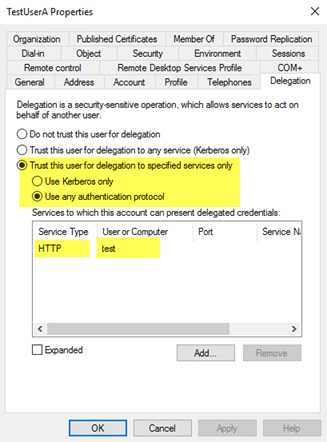
図 2. TestUserA は HTTP/test サービスに委任できる。
制約付き委任(constrained delegation)の注意点として、フォレスト間(cross-forest)では機能しないことが挙げられます。
アカウントに制約付き委任(constrained delegation)が設定されると、裏側で次の2つが発生します:
- そのオブジェクトの userAccountControl 属性が、“TRUSTED_TO_AUTHENTICATE_FOR_DELEGATION”フラグで更新されます。
- msDS-AllowedToDelegateTo 属性には、委任タブで設定した SPN が入力されます。
制約付き委任(constrained delegation)の悪用は、無制約付き委任(unconstrained delegation)の悪用とは異なります。悪用される代表的な方法の1つは、攻撃者が、制約付き委任が設定されたユーザーアカウントの平文パスワードまたは NTLM ハッシュを侵害(入手)できる場合です。ツールの Kekeo を使うことで、パスワードを把握しているアカウントの TGT を要求し、(ユーザーが「Sensitive」にマークされていない限り)任意のユーザーに対して TGS 要求を実行し、その後チケットを注入して、そのユーザーとして要求したサービスにアクセスできます。
リソースベースの制約付き委任(Resource-Based Constrained Delegation)
Windows Server 2012で導入されたリソースベースの制約付き委任(resource-based constrained delegation)は、制約付き委任を構成する方法を変更し、信頼をまたいで動作します。どのオブジェクトがどのサービスに委任できるかを指定する代わりに、サービスをホストするリソース側が、それに委任できるオブジェクトを指定します。管理の観点では、リソースの所有者が、誰がそのリソースにアクセスできるかを制御できるようになります。たとえば、制約付き委任で「WebServer サービスアカウントが、データベースにアクセスするために SQL Service に委任できる」と指定する代わりに、「SQL サーバーのサービスアカウントにおいて、WebServer サービスアカウントが委任アクセス権限を持つ」ことを指定できます。
リソースベースの制約付き委任は、対象リソース上で msDS-AllowedToActOnBehalfOfOtherIdentity 属性に、そのリソースへ委任することを許可されたオブジェクトの SID を設定することで構成します。リソースベースの制約付き委任を構成するには PowerShell を使用する必要があります。Active Directory Users and Computers 内には GUI コンポーネントがなく、Attribute Editor ページではこの属性を手動で変更できません。
リソースベースの制約付き委任(Resource-Based Constrained Delegation)およびそれを悪用する方法については こちら。
既存の Kerberos 委任の特定
さまざまな種類の委任(delegation)に関する基礎と、それらが悪用され得るいくつかの方法について理解できたところで、次は、あなたの環境ですでにどの種類の委任が構成されているかを把握するために使える手法を共有したいと思います。特に、ドメイン コントローラー以外のオブジェクトに無制約の委任(unconstrained delegation)が構成されているなどの、安全でないシナリオを強調して見ていきます。
次のスクリプトは、もともと Microsoft Technet ギャラリーに投稿されていたものです。無制約(unconstrained)、制約(constrained)、およびリソースベースの制約(resource-based constrained)委任が設定されているアカウントを特定し、一覧に含まれている各種構成に関する情報と、潜在的な警告を強調表示します。:
<#.Synopsis Search the domain for accounts with Kerberos Delegation..DESCRIPTION Kerberos Delegation is a security sensitive configuration. Especially full (unconstrained) delegation has significant impact: any service that is configured with full delegation can take any account that authenticates to it, and impersonate that account for any other network service that it likes. So, if a Domain Admin were to use that service, the service in turn could read the hash of KRBRTG and immediately effectuate a golden ticket. Etc :) This script searches AD for regular forms of delegation: full, constrained, and resource based. It dumps the account names with relevant information (flags) and adds a comment field for special cases. The output is a PSObject that you can use for further analysis. Note regarding resource based delegation: the script dumps the target services, not the actual service doing the delegation. I did not bother to parse that out. Main takeaway: chase all services with unconstrained delegation. If these are _not_ DC accounts, reconfigure them with constrained delegation, OR claim them als DCs from a security perspective. Meaning, that the AD team manages the service and the servers it runs on..EXAMPLE .Search-KerbDelegatedAccounts.ps1 | out-gridview.EXAMPLE .Search-KerbDelegatedAccounts.ps1 -DN "ou=myOU,dc=sol,dc=local".NOTES Version: 0.1 : first version. 0.2 : expanded LDAP filter and comment field. Author: Willem Kasdorp, Microsoft. Creation Date: 1/10/2016 Last modified: 4/11/2017#>[CmdletBinding()]Param( # start the search at this DN. Default is to search all of the domain. [string]$DN = (Get-ADDomain).DistinguishedName)$SERVER_TRUST_ACCOUNT = 0x2000$TRUSTED_FOR_DELEGATION = 0x80000$TRUSTED_TO_AUTH_FOR_DELEGATION= 0x1000000$PARTIAL_SECRETS_ACCOUNT = 0x4000000 $bitmask = $TRUSTED_FOR_DELEGATION -bor $TRUSTED_TO_AUTH_FOR_DELEGATION -bor $PARTIAL_SECRETS_ACCOUNT# LDAP filter to find all accounts having some form of delegation.# 1.2.840.113556.1.4.804 is an OR query.$filter = @"(& (servicePrincipalname=*) (| (msDS-AllowedToActOnBehalfOfOtherIdentity=*) (msDS-AllowedToDelegateTo=*) (UserAccountControl:1.2.840.113556.1.4.804:=$bitmask) ) (| (objectcategory=computer) (objectcategory=person) (objectcategory=msDS-GroupManagedServiceAccount) (objectcategory=msDS-ManagedServiceAccount) ))"@ -replace "[sn]", ''$propertylist = @( "servicePrincipalname", "useraccountcontrol", "samaccountname", "msDS-AllowedToDelegateTo", "msDS-AllowedToActOnBehalfOfOtherIdentity")Get-ADObject -LDAPFilter $filter -SearchBase $DN -SearchScope Subtree -Properties $propertylist -PipelineVariable account | ForEach-Object { $isDC = ($account.useraccountcontrol -band $SERVER_TRUST_ACCOUNT) -ne 0 $fullDelegation = ($account.useraccountcontrol -band $TRUSTED_FOR_DELEGATION) -ne 0 $constrainedDelegation = ($account.'msDS-AllowedToDelegateTo').count -gt 0 $isRODC = ($account.useraccountcontrol -band $PARTIAL_SECRETS_ACCOUNT) -ne 0 $resourceDelegation = $account.'msDS-AllowedToActOnBehalfOfOtherIdentity' -ne $null $comment = "" if ((-not $isDC) -and $fullDelegation) { $comment += "WARNING: full delegation to non-DC is not recommended!; " } if ($isRODC) { $comment += "WARNING: investigation needed if this is not a real RODC; " } if ($resourceDelegation) { # to count it using PS, we need the object type to select the correct function... broken, but there we are. $comment += "INFO: Account allows delegation FROM other server(s); " } if ($constrainedDelegation) { $comment += "INFO: constrained delegation service count: $(($account.'msDS-AllowedToDelegateTo').count); " } [PSCustomobject] @{ samaccountname = $account.samaccountname objectClass = $account.objectclass uac = ('{0:x}' -f $account.useraccountcontrol) isDC = $isDC isRODC = $isRODC fullDelegation = $fullDelegation constrainedDelegation = $constrainedDelegation resourceDelegation = $resourceDelegation comment = $comment }}
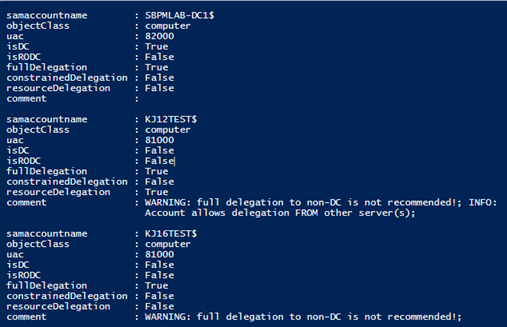
図 3. 問題のある委任を特定するためのサンプルスクリプト
Netwrix が支援できること
Netwrix Active Directory security solution により、Active Directory をエンドツーエンドで保護できます。次のことが可能です:
- Active Directory 内の脆弱性を特定し、緩和します。過剰な権限、「shadow(影の)」管理者、使われていないアカウント、 弱いパスワード など。
- AD の設定と権限を制御し、強力な パスワード ポリシー を適用して、資格情報の盗難を防止します。
- 高度な脅威であっても検知し、悪意のある行為者が任務を完了する前にその行動を止めます。
- 自動化された対応アクションでセキュリティ侵害を即座に封じ込め、ビジネスへの被害を最小限に抑えます。
- 悪意のある、またはその他の不適切な変更を、最小限のダウンタイムでロールバックまたは復旧します。
共有する
もっと詳しく
著者について

Kevin Joyce
プロダクトマネジメント担当ディレクター
Netwrix のプロダクトマネジメント担当ディレクター。Kevin はサイバーセキュリティに情熱を持ち、特に攻撃者が組織の環境を悪用するために用いる戦術や手法を理解することに注力しています。Active Directory と Windows のセキュリティに焦点を当てたプロダクトマネジメントでの 8 年の経験を通じて、その情熱を活かし、組織がアイデンティティ、インフラ、データを保護できるようなソリューションの構築を支援しています。