
Netwrix Auditor for Active Directory
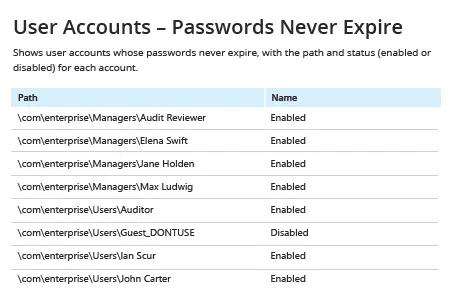
- Netwrix Auditor を実行 → 「Reports」へ移動 → 「Active Directory」を開く → 「Active Directory - State-in-Time」へ進む → 「User Accounts – Passwords Never Expire」を選択 → 「View」をクリック。
- メールでレポートを定期的に受け取るには、「Subscribe」ボタンをクリックし、希望するスケジュールを選択してください。
ネイティブ監査
- Powershell ISE を開き → 次のコードで新しいスクリプトを作成して実行し、エクスポート先のパスを指定します:
      # Import the AD module to the session

Import-Module ActiveDirectory

#Search for the users and export report

get-aduser -filter * -properties Name, PasswordNeverExpires | where {
$_.passwordNeverExpires -eq "true" } | Select-Object DistinguishedName,Name,Enabled |
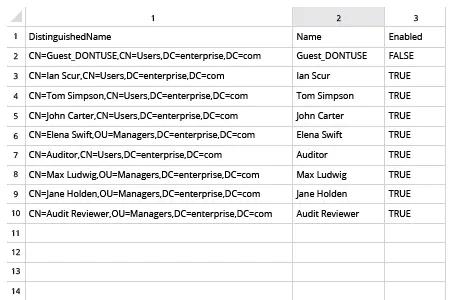
Export-csv c:\data\pw_never_expires.csv -NoTypeInformation
- スクリプトによって生成されたファイルを MS Excel で開きます。
共有する