
ネイティブ監査
- PowerShell ISE を開き → 次のスクリプトを実行し、ディレクトリのパスと時間枠を調整してください:
      Get-ChildItem -Path \\pdc\Shared\Accounting\*.* -Filter * | ? {
$_.LastWriteTime -gt (Get-Date).AddDays(-1)
}
- 結果を確認してください:
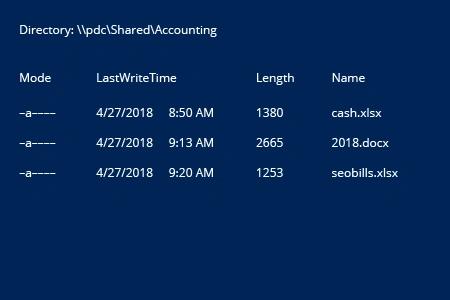
Windows ファイルサーバー用 Netwrix Auditor for
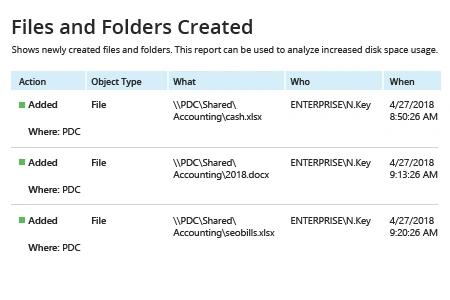
- Netwrix Auditor を実行 → 「Reports」に移動 → 「File Servers」を開く → 「File Servers Activity」に進む → 「Files and Folders Created」を選択 → 「View」をクリックします。
Netwrix Auditor を使って新しいファイルが追加されるフォルダーを監視するのは簡単です。 「Subscribe」オプションを選択し、スケジュールと受信者を定義するだけです。
共有する