
ネイティブ監査
- gpedit.msc を実行 → 新しい GPO を作成 → 編集 → 「Computer Configuration」→「Policies」→「Windows Settings」→「Security Settings」→「Local Policies」>「Audit Policy」に移動:
- Audit account management → Define → Success.
- Go to Event Log → Define:
- Maximum security log size to 4GB
- Retention method for security log to Overwrite events as needed.
- Link the new GPO to OU with User Accounts → Go to "Group Policy Management" → Right-click the defined OU → Choose "Link an Existing GPO" → Choose the GPO that you’ve created.
- グループ ポリシーの更新を強制する → 「Group Policy Management」→ 定義済みの OU を右クリック → 「Group Policy Update」をクリックします。
- ADSI Edit を開く → 既定の名前付けコンテキストに接続 → ドメイン名の付いた DomainDNS オブジェクトを右クリック → プロパティ → セキュリティ(タブ)→ 詳細(ボタン)→ 監査(タブ)→ プリンシパル「Everyone」を追加 → 「Success」と入力 → 「This object and Descendant objects」に適用 → 権限 → 以下を除くすべてのチェック ボックスを選択します:
- フル コントロール
- 内容の一覧表示
- すべてのプロパティを読み取る
- 読み取り権限 → 「OK」をクリックします。
- イベント ビューアーを開き、セキュリティ ログでイベント ID 4725(ユーザー アカウント管理タスク カテゴリ)を検索します。
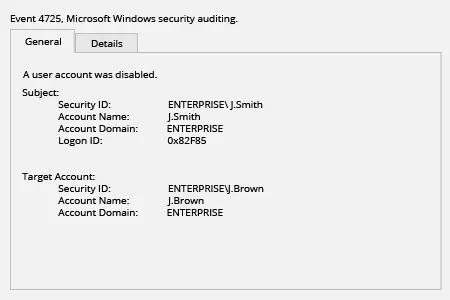
Netwrix Auditor for Active Directory
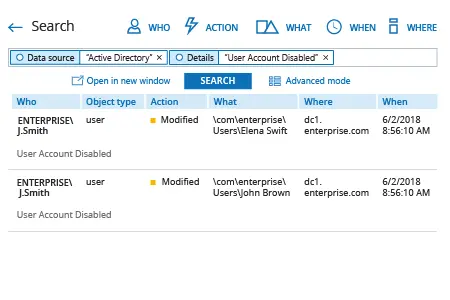
- Netwrix Auditor を実行 → 「検索」に移動 → 選択されていない場合は「高度なモード」をクリック → 次のフィルターを設定します:
- フィルター = "Data source"
演算子 = "Equals"
値 = "Active Directory" - フィルター = "詳細"
演算子 = "含む"
値 = "ユーザー アカウント無効"
- フィルター = "Data source"
- 「検索」ボタンをクリックし、Active Directory で誰がどのユーザー アカウントを無効にしたかを確認してください。
共有する