
期限が切れる前にユーザーへパスワード変更を促す方法
ネイティブ ソリューション vs. Netwrix Auditor for Active Directory
Netwrix Auditor for Active Directory
- Netwrix Password Expiration Notifier を実行します → ドメインを選択します → 「Edit」をクリックします → 「Enable password expiration alerting」をクリックします → 「Save」をクリックします。
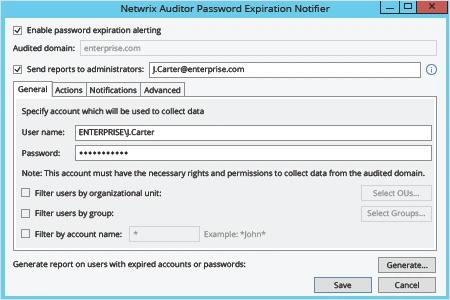
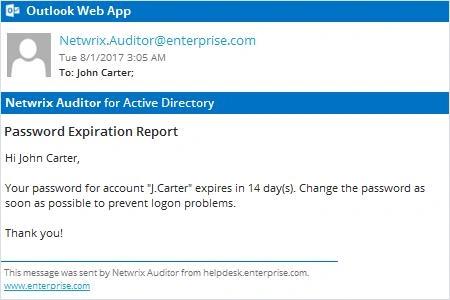
Netwrix Auditor は、パスワードがまもなく期限切れになる各アカウント所有者に対して、Active Directory のパスワード期限切れ通知メールを自動的に送信します。
ネイティブ監査
- PowerShell ISE を使用して、次のスクリプトをコピーして修正し、保存してください:
      #requires -module ActiveDirectory

<#
.SYNOPSIS
Script will scan Active Directory for accounts with expiring passwords

.DESCRIPTION
Script will scan Active Directory for accounts with expiring passwords and will send customized email to users

.PARAMETER Domain
.PARAMETER specifies which domain search will be performed against

.PARAMETER Cred
The PS credential to use to query AD (if not using the logged in credential)

.PARAMETER SearchBase
The OU path to search for user accounts in

.PARAMETER PasswordExpirationThreshold
Specifies accounts where this value exceeded will be emailed

.PARAMETER Subject
Which subject shall be put into email

.PARAMETER From
Which address shall be used as a FROM field in Email

.PARAMETER EmailServerAddress
SMTP relay address

.PARAMETER FailoverEmail
Emails address where all errors will be sent to

.PARAMETER LogFilePath
The path to where the informational log file is generated by this script.
#>

[CmdletBinding()]
Param(
[string]$Domain = $env:USERDNSDOMAIN,
[PSCredential]$cred,
[string]$SearchBase,
[string]$UserSearchString = '*',
[int]$PasswordExpirationThreshold = 14,
[string]$Subject = "Password Expiration Notification",
[string]$From = "J.Carter@enterprise.com",
[string]$EmailServerAddress = "mail.enterprise.com",
[string]$FailoverEmail = "J.Carter@enterprise.com",
[string]$LogFilePath = 'D:\Temp\ServiceAccountExpirations.log'
)

begin {
function Write-Log($Message) {
$MyDateTime = Get-Date -Format 'MM-dd-yyyy H:mm:ss'
Add-Content -Path $LogFilePath -Value "$MyDateTime - $Message"
}
try {
$MaxPasswordAge = (Get-ADDefaultDomainPasswordPolicy -Server $Domain).MaxPasswordAge.Days
Write-Log -Message "The max password age for the $Domain domain is $MaxPasswordAge"
if ($PasswordExpirationThreshold -gt $MaxPasswordAge) {
throw "The value '$PasswordExpirationThreshold' specified as the password expiration threshold is greater than the max password age for the domain" }

[string]$EmailTemplate = @'
<html> <body> <font SIZE="6" COLOR="#ff0000"> <p ALIGN="CENTER" style='font-size:20.0pt;font-family:"Times New Roman";color:#CC0000;mso-bidi-font-weight: bold'>Password Expiration Notice</p> </font><font style='font-size:14.0pt;font-family:"Times New Roman";color:#1C1C1C;mso-bidi-font-weight:bold'> <p>Dear $FirstName $LastName,</p> <p>Your password in <U> $domain </U> domain will expire in $DaysBeforeExpiration days. Please change it as soon as possible to make sure your account does not get locked out. To change your password press CTRL+ALT+DEL and select "Change Password". </p> <p>Please review the guidelines below as they are necessary for successfully updating your password.</p> <p>PASSWORD MUST:</p> <dir> <p>Be at least 8 total characters</p> <p>Contain at least one uppercase character</p> <p>Contain at least one numeral</p> <p>Not be the same or similar to the last 5 used passwords</p> <p>Be used for at least 24 hours before changing again</p> </dir> <p></p> <p>If you enter an incorrect password 5 or more times, your account will be locked and you will need to contact the Help Desk for assistance. </p> </font><font SIZE="4" style='font-size:13.0pt;font-family:"Times New Roman";color:#CC0000'> <p ALIGN="CENTER">*** Please do not respond to this e-mail. <BR>Direct any questions or concerns regarding this issue to the IT Help Desk. <BR> For information on how to contact the Help Desk, please visit </font> <a HREF="http://helpdesk.enterprise.com"> <font SIZE="4" COLOR="#0000ff"><u> http://helpdesk.enterprise.com/ </u></font> </dir> </font></b> </body> </html>
'@
} catch {
Write-Log -Message $_.Exception.Message
exit
}
}
process {
try {
$GetAdUserParams = @{
'Filter' = { (Enabled -eq $True) -and (PasswordNeverExpires -eq $false) -and (samAccountName -like $UserSearchString)}
'Properties' = 'PasswordLastSet', 'PasswordExpired', 'PasswordNeverExpires','EmailAddress'
}
if ($SearchBase) {
$GetAdUserParams.SearchBase = $SearchBase
}
if ($Cred) {
$GetAdUserParams.Credential = $cred
}
$Today = Get-Date
$Users = Get-ADUser @GetAdUserParams | Where-Object { $_.PasswordLastSet -and !$_.PasswordExpired }
Write-Log -Message "Found '$($Users.Count)' total expirable AD user accounts"
$ExpiringUsers = [System.Collections.ArrayList]@()
foreach ($User in $Users) {
$UserPwdExpireDate = $User.PasswordLastSet.AddDays($MaxPasswordAge)
$DaysUntilExpire = ($UserPwdExpireDate - $Today).Days
$FirstName = $User.GivenName
$LastName = $User.Surname
if ($DaysUntilExpire -le $PasswordExpirationThreshold) {
Write-Log -Message "The user $($User.samAccountName)'s password will expire in $DaysUntilExpire days"
$EmailBody = $EmailTemplate.Replace('$FirstName', $FirstName).Replace('$LastName', $LastName).Replace('$DaysBeforeExpiration', $DaysUntilExpire).Replace('$domain', $Domain)
Send-MailMessage -To $User.EmailAddress -From $From -Subject $Subject -BodyAsHtml $EmailBody -SmtpServer $EmailServerAddress -Priority High -UseSsl
$ExpiringUsers.Add($User) | Out-Null
}
}
Write-Log -Message "'$($ExpiringUsers.Count)' accounts found with expiring passwords within $PasswordExpirationThreshold days"
} catch {
Write-Log -Message "$($_.Exception.Message) - $($_.InvocationInfo.ScriptLineNumber)"
}
}
- タスク スケジューラ(Task Scheduler)でスクリプトの実行を自動化します。
詳しくはこちら:Netwrix Auditor for Active Directory
ユーザーにパスワード変更をリマインドして、生産性を最大化し、ヘルプデスクの負荷を軽減
多くのベストプラクティスでは、内部者および外部者の脅威から企業データや重要システムを守るために、定期的なパスワード変更が求められます。しかし、ユーザーがパスワード変更の通知を無視したり、そもそも通知をまったく受け取れなかったりする(たとえばリモートワークの場合)と、期限切れのパスワードをリセットするためにヘルプデスク管理者を待たなければならず、結果として生産性があらゆる面で低下します。強力なパスワードセキュリティポリシーを維持しながらヘルプデスクの負荷を最小限にするには、IT担当者は、ユーザーに対してパスワード失効をより効率的に通知する方法が必要です。
Netwrix Auditor for Active Directory により、IT担当者は Active Directory およびグループ ポリシーで何が起きているかを完全に把握できます。さらに、ユーザーがパスワードの有効期限が切れる前に変更するようリマインドする通知メールも送信可能です。IT 管理者は アラート をカスタマイズして、パスワードの失効までの残り日数を正確に指定することもできます。加えて、IT 管理者は、パスワードがまもなく期限切れになるユーザー アカウントを示す要約レポートも受け取れます。これらのアラートとレポートにより、IT担当者はユーザーやヘルプデスクの生産性を損なうことなくセキュリティを強化できます。
共有する