
Top Free Active Directory Management Tools
Sep 6, 2026
Free Active Directory management tools handle lockouts, stale accounts, permissions reporting and bulk changes without a purchase order, and most teams already run several without having picked them deliberately. Each one stops somewhere specific. Knowing where the free editions end, and which gaps close only with a licensed product, decides how the next audit goes.
Active Directory (AD) remains the primary identity store in most organizations, which also makes it the first place an intruder looks. In the survey behind The Netwrix 2026 Data and Identity Security Report, 73% of security and IT leaders said they weren't fully confident their AD is free of privilege-escalation misconfigurations, and only 36% had run a comprehensive AD security assessment in the past 12 months.
Tooling is a large part of that gap. The right AD tools shorten routine work, surface problems before an auditor does, and let a small team cover an environment that would otherwise need more people. The wrong ones create a false sense of coverage.
This list covers the Active Directory management tools worth knowing, grouped by what they cost and what they actually do. Some are free forever, some are free up to an object cap, and some are trials that expire.
Tool | Cost model | Best for |
|---|---|---|
|
Active Directory Explorer |
Free |
Browsing, editing and snapshot comparison |
|
Microsoft AdRestore |
Free |
Restoring tombstoned objects |
|
Netwrix Auditor for Active Directory Community Edition |
Free |
Daily change and logon summaries |
|
Netwrix Account Lockout Examiner |
Free |
Root-causing account lockouts |
|
Netwrix Effective Permissions Reporting Tool |
Free |
Point-in-time permissions reporting |
|
Netwrix Bulk Password Reset |
Free |
Resetting local admin passwords at scale |
|
Netwrix Inactive User Tracker |
Free |
Finding stale accounts on premises |
|
Netwrix Password Expiration Notifier |
Free |
Password expiry reminders and reports |
|
Cjwdev Active Directory Info |
Free edition |
Attribute-level AD queries |
|
Cjwdev AD Permissions Reporter |
Free edition |
Permissions reporting |
|
Cjwdev AD Tidy |
Free edition |
Bulk account cleanup |
|
LDAPSoft AD Browser |
Free |
Read-only browsing and SQL-LDAP queries |
|
wiseDATAman Password Control |
Free |
Helpdesk password resets |
|
SysOp Tools AD Query |
Free, non-commercial |
Object and schema attribute lookup |
|
SysAdmin Anywhere |
Free, open source |
Web-based AD administration |
|
AlbusBit AD FastReporter |
Free edition, Pro from $149 |
Predefined AD reporting |
|
ManageEngine ADManager Plus |
Free to 100 objects |
Bulk management and delegation |
|
MaxPowerSoft AD Reports |
Free to 200 objects |
Reporting across AD and Entra ID |
|
SolarWinds Access Rights Manager |
30-day trial |
Access rights auditing and provisioning |
|
Adaxes |
Trial |
Unified AD, Entra ID and Microsoft 365 management |
|
Softerra LDAP Administrator |
30-day trial |
Direct LDAP directory management |
|
ENow AD Monitoring and Reporting |
Trial |
Real-time AD infrastructure monitoring |
|
Zohno Z-Hire and Z-Term |
Trial |
Onboarding and offboarding automation |
|
CENTREL Solutions XIA Automation |
Trial |
Bulk provisioning from CSV |
Netwrix PingCastle scores an Active Directory domain against known attack paths and misconfigurations before an attacker finds them first. Launch the in-browser demo.
How to choose a free Active Directory management tool
Choosing well comes down to four criteria, and most tools that get installed once and forgotten fail at least one.
Scope is the first consideration, since single-task utilities solve one problem well, such as tracking down a locked account, while broader products cover provisioning, reporting and auditing together. Most teams end up running a handful of utilities alongside one licensed product.
Access model matters just as much, since read-only tools are safe to hand to junior staff and helpdesk teams, whereas anything that writes to AD needs tighter controls, because a bulk operation applied to the wrong organizational unit (OU) is painful to reverse. Proper Active Directory delegation reduces how often anyone needs broad rights in the first place.
"Free" means three different things across this list, and vendors rarely spell out which one applies. Some tools stay free forever, some are free editions capped by object count, and some are trials that expire. Check which one you're getting before building a recurring process on top of it.
Audit trail tends to be the gap teams discover only after the fact. A reporting tool shows the current state, so if you need to show who changed what and when, you need a solution tracking the changes in AD instead.
Microsoft tools for managing Active Directory
Microsoft ships a set of AD tools tailored to specific management tasks. They're available directly within Windows Server and can also run on Windows 10 or Windows 11 by installing Remote Server Administration Tools (RSAT).
The most commonly used Microsoft AD tools include the following:
- Active Directory Users and Computers (ADUC): This Microsoft Management Console (MMC) snap-in handles day-to-day work such as user provisioning and managing groups, computers and OUs. Installing and using ADUC requires only the RSAT feature enabled on the workstation.
- Active Directory Administrative Center (ADAC): As the modern alternative to ADUC, ADAC adds the Active Directory Recycle Bin, fine-grained password policy management, and a PowerShell History Viewer that shows the cmdlet behind every action taken in the interface. That last feature makes ADAC a practical way to pick up AD scripting.
- Group Policy Management Console (GPMC): This console creates and manages Group Policy objects (GPOs), which centrally configure user and computer environments across the network, from security settings to software deployment. The Ultimate Guide to Group Policy Management goes deeper.
- Active Directory Sites and Services: This tool manages replication between domain controllers (DCs) and configures AD network topology.
- ADSI Edit: A low-level editor exposing every attribute of every AD object, including the ones other consoles hide. It's powerful and unforgiving, so treat it as a last resort.
- System Center Configuration Manager (SCCM): SCCM covers larger environments, from deploying applications, updates and operating systems to managing inventory and compliance.
These tools handle basic AD management, though they stop short of automation and reporting depth.
Free third-party Active Directory management tools
The tools below cost nothing to run, though "free" carries different conditions in each case.
Active Directory Explorer
Active Directory Explorer (AD Explorer) is a free Sysinternals utility for viewing and editing AD. It navigates the directory, saves favorite locations, and inspects object properties and attributes. Administrators can modify permissions, review an object's schema, and build complex searches to save and reuse.
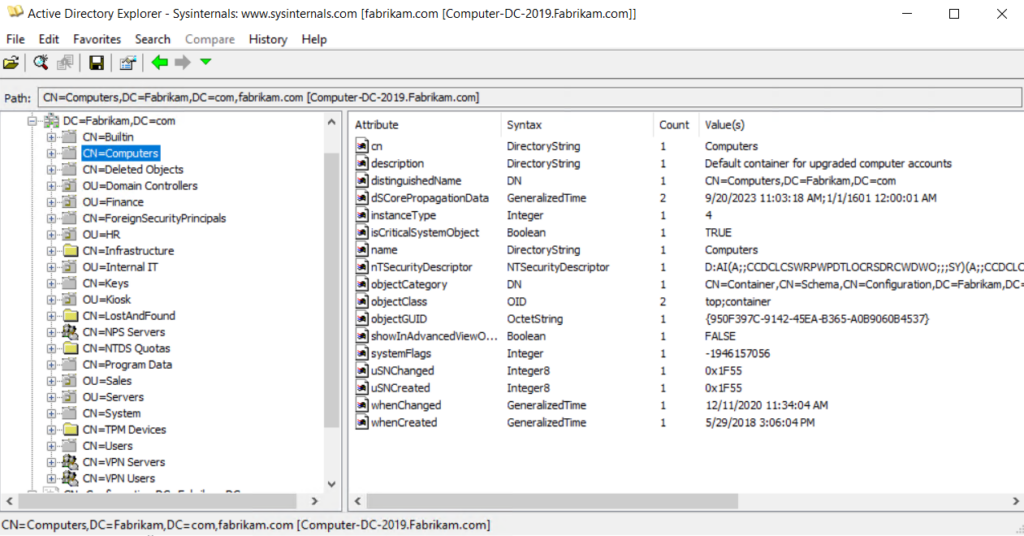
Active Directory Explorer browsing directory objects and attributes
Its most useful feature is snapshots. AD Explorer captures the AD database for offline analysis, then loads the snapshot as though it were connected to the live directory. A built-in comparison tool highlights differences in objects, attributes and permissions between two snapshots, which gives you a rough change record without a monitoring product.
Microsoft AdRestore
Windows Server 2003 introduced restoring deleted, or tombstoned, objects. Microsoft AdRestore is a single-task command-line tool that enumerates tombstoned objects in a domain and restores them individually. On Windows Server 2008 R2 and later, the Active Directory Recycle Bin in ADAC handles most restore work more cleanly, so AdRestore mainly serves older environments.
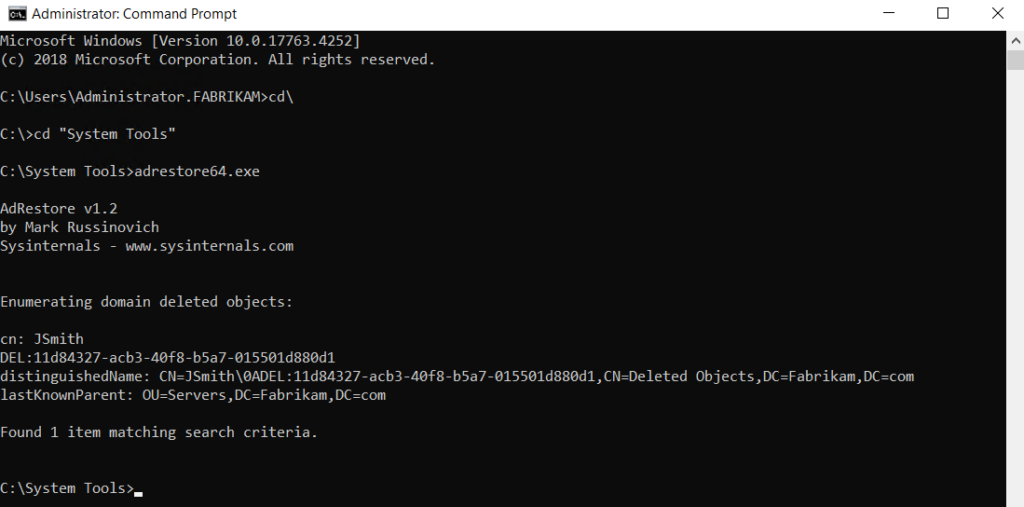
Microsoft AdRestore enumerating tombstoned AD objects at the command line
Netwrix Auditor for Active Directory Community Edition
Netwrix Auditor for Active Directory Community Edition tracks user logons and changes to AD users, groups, OUs, GPO links and policies, then emails a daily summary of the previous 24 hours. It's a free download with no expiration date.
The free edition reports what changed and when, but doesn't identify which account made the change. It also leaves out interactive search, predefined compliance reports mapped to standards such as PCI DSS, HIPAA and GDPR, alerting, dashboards, long-term storage and role-based access controls, and it sends its summary to one recipient. That makes it a day-to-day troubleshooting tool rather than a compliance archive.
Netwrix Account Lockout Examiner
Netwrix Account Lockout Examiner cuts the time spent chasing AD account lockouts. One click traces the cause, whether that's an improperly mapped network drive, a service or scheduled task running under stale credentials, or an outdated password cached on a mobile device. Locked service accounts, which are usually the hardest to diagnose, are where it earns its place.
It's a free download with no trial period or expiration, and it requires Windows 8.1 or later with .NET Framework 4.5.
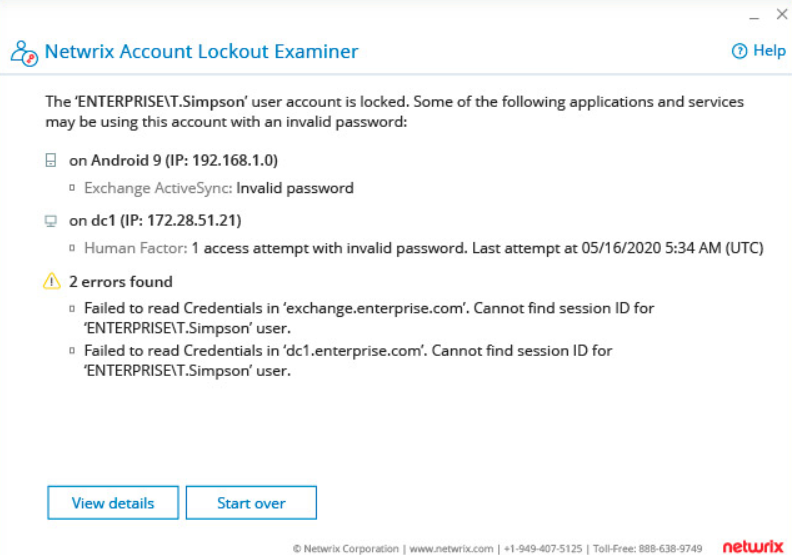
Netwrix Account Lockout Examiner showing the root cause of a locked AD account.
Netwrix Effective Permissions Reporting Tool
Netwrix Effective Permissions Reporting Tool reports user permissions across Active Directory and file servers, separating explicitly assigned permissions from those inherited through group membership. That distinction is what makes the output usable during an access review.
The tool is free with no license fee or time limit. It delivers a point-in-time view of who has access right now, and it doesn't record who changed that access or when, so pair it with change tracking if you need history. Reviewing effective permissions regularly is one practical step toward the principle of least privilege.
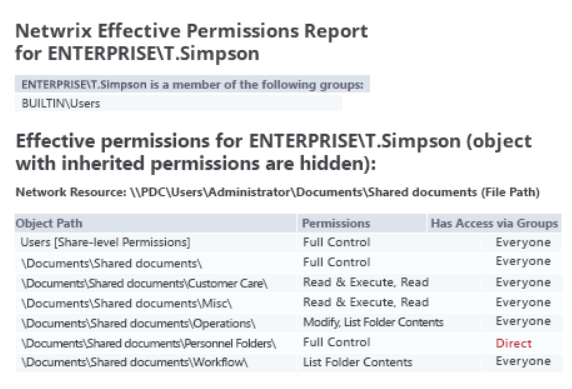
Netwrix Effective Permissions Reporting Tool output for AD and file server permissions
Netwrix Bulk Password Reset
Netwrix Bulk Password Reset resets local admin and user passwords across many workstations at once, remotely, without signing into each machine. You can target specific machines, OUs or entire domains, or import a custom computer list from a text file. It's free with no license fee and never expires.
Netwrix Auditor picks up where the free Community Edition stops, adding who-changed-what attribution, compliance-mapped reporting and long-term retention. Start a free trial.
Netwrix Inactive User Tracker
Netwrix Inactive User Tracker finds dormant user accounts and reports on their age and inactivity period, so you can decide what to disable or delete. Set a threshold such as 90 days, and the tool will disable matching accounts or move them to a designated OU on a schedule.
It queries on-premises domain controllers directly and doesn't cover Entra ID, which matters if your cleanup needs to span both. Stale accounts are a standing risk, since every dormant account with live credentials is a candidate for privilege escalation.
Netwrix Password Expiration Notifier
Netwrix Password Expiration Notifier emails users and their managers before passwords expire and sends summary reports of upcoming expirations. Fewer expired passwords means fewer helpdesk calls, and it keeps password rotation aligned with policy without manual chasing. It's a free download with no expiration.
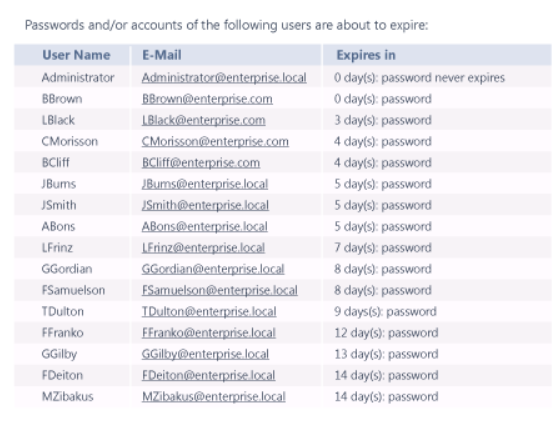
Netwrix Password Expiration Notifier summary report of upcoming password expirations
Cleaning up stale accounts and reviewing permissions are the two jobs most often deferred until an audit forces them. If your last comprehensive AD assessment is more than a year behind, start there rather than adding another utility.
Cjwdev Active Directory Info, Free Edition
The free edition of Cjwdev Active Directory Info runs queries against the attributes you choose. It resolves direct and nested group membership and queries each domain controller for non-replicated attributes, which keeps results accurate in multi-DC environments.
Multi-domain querying works with straightforward domain name and credential inputs and reports export to CSV, HTML or TXT covering locked accounts, disabled users, accounts flagged "password never expires," and GPOs modified in the last 30 days.
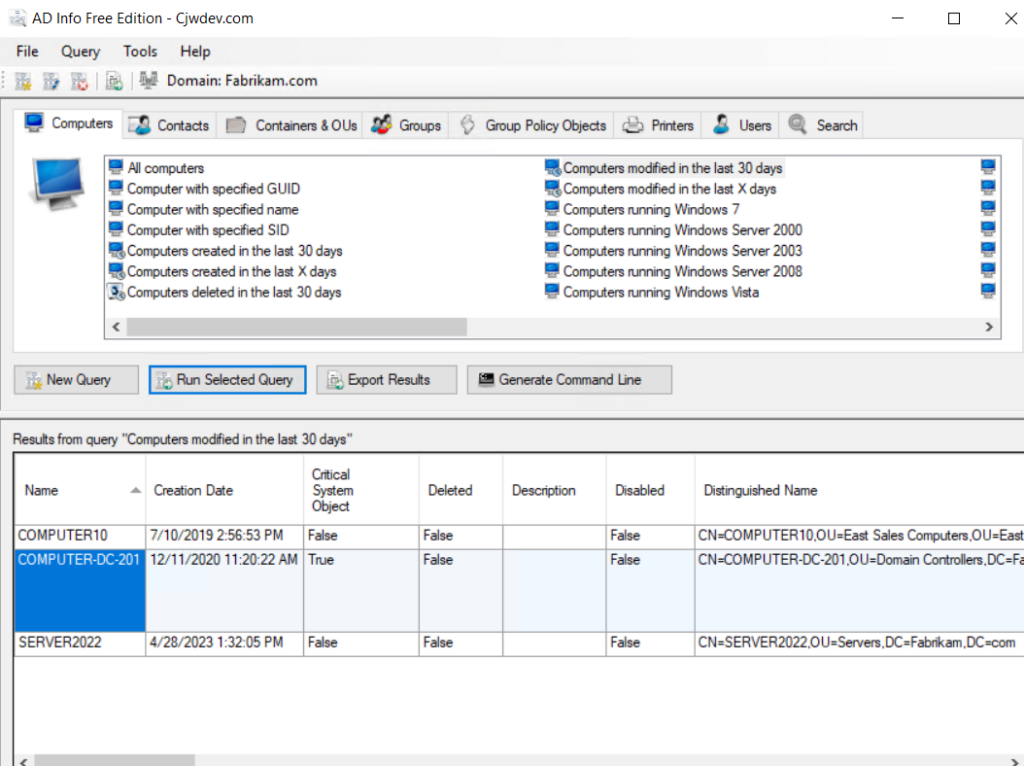
Cjwdev Active Directory Info generating an attribute-level AD report
Cjwdev AD Permissions Reporter, Free Edition
The free edition of Cjwdev AD Permissions Reporter reports on security permissions for AD objects, and exports results to CSV or HTML. The paid Standard edition adds more reporting options.
Cjwdev Group Manager
Cjwdev Group Manager lets a group's owner manage that group's membership and settings, including adding and removing members and exporting the member list to CSV. Delegating group management this way keeps routine membership changes away from domain admin accounts.
Cjwdev Managed Service Accounts GUI
Cjwdev Managed Service Accounts GUI configures group managed service accounts through an interface rather than PowerShell, and it works across multiple domains with the right credentials.
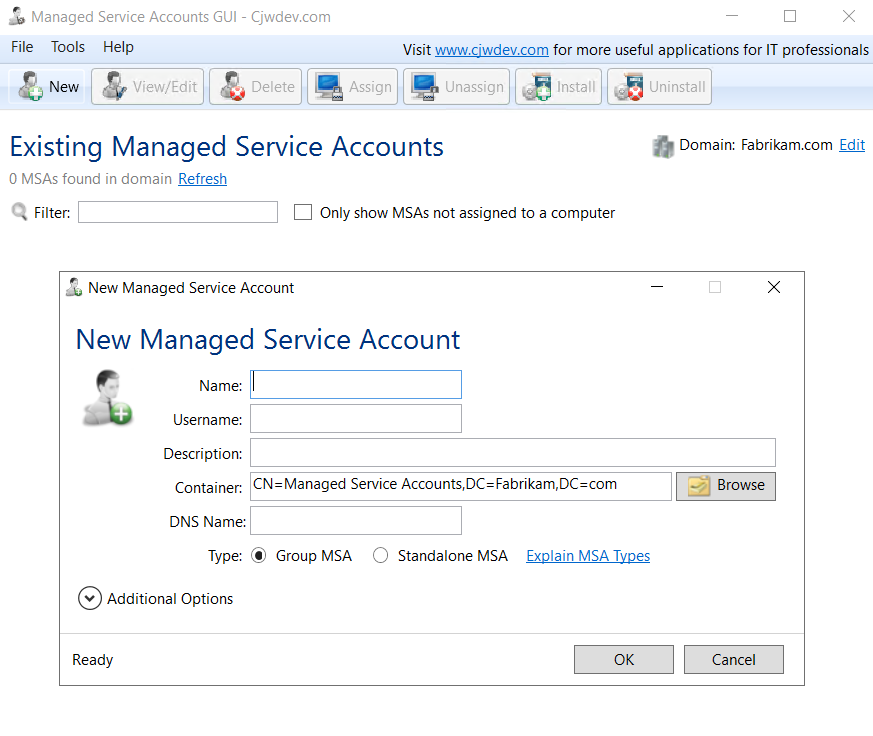
Cjwdev Managed Service Accounts GUI configuring an MSA
Cjwdev AD Tidy
Cjwdev AD Tidy manages AD accounts in bulk and cleans up obsolete or inactive ones. Typical jobs include adding many accounts to a security group, or setting random passwords or a specific expiry date across a set of accounts.
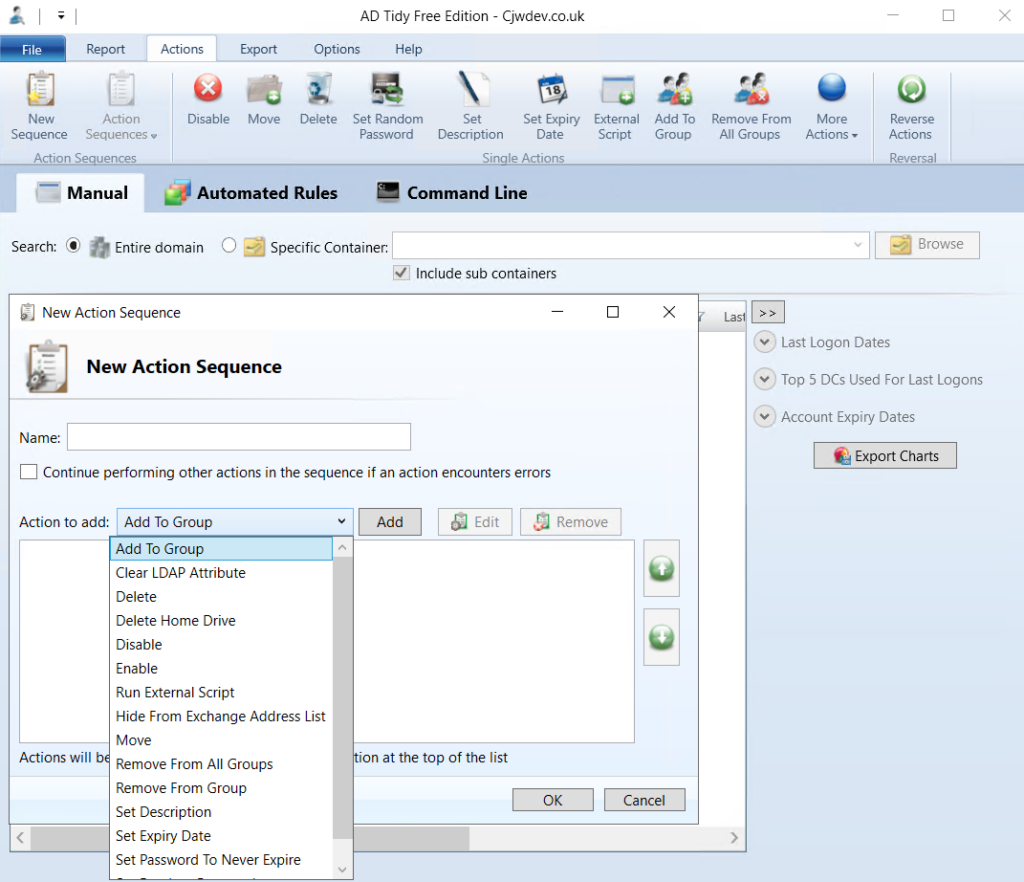
Cjwdev AD Tidy identifying inactive accounts for bulk cleanup
LDAPSoft AD Browser
LDAPSoft AD Browser gives read-only access to the AD hierarchy, with text and visual search including a quick search bar for common lookups such as employee emails and names. It displays all available attributes, runs SQL-LDAP statements, and supports both v2 and v3 of the Lightweight Directory Access Protocol (LDAP) across multiple directories.
The current release is a Windows desktop application distributed as 64-bit only, and it's free for commercial and non-commercial use. Read-only access makes it safe to give to staff who need to look things up without changing anything.
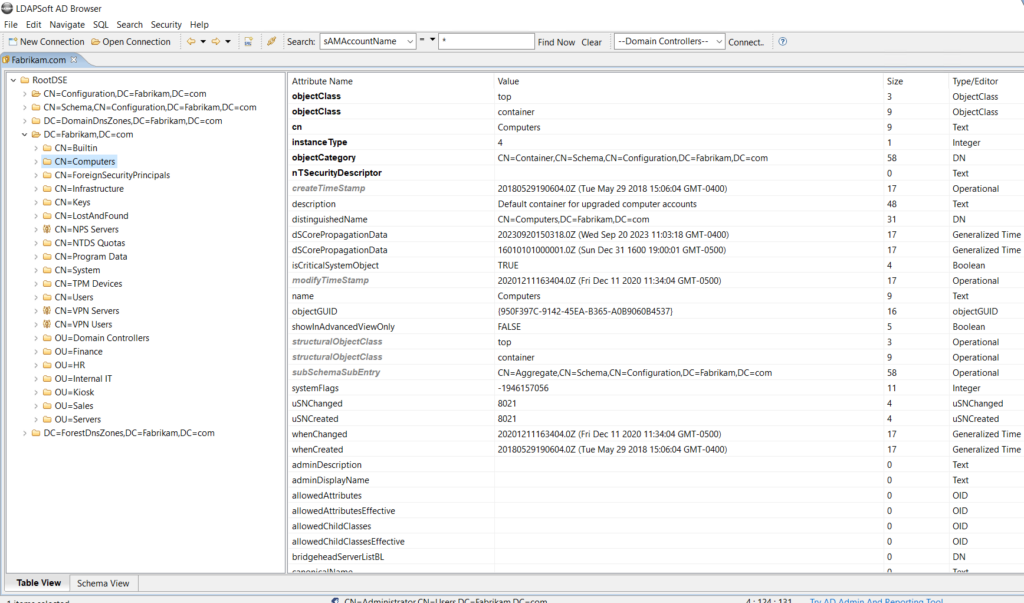
LDAPSoft AD Browser displaying AD object attributes in read-only mode
wiseDATAman Password Control
wiseDATAman Password Control gives helpdesk teams an alternative to the MMC console for password resets, including bulk resets that save time on service account maintenance. The tool moved with its publisher from the retired wisesoft.co.uk site to wisedataman.com, where it stays free and no longer requires registration. Pair it with a sound Active Directory password policy so resets don't reintroduce weak credentials.
SysOp Tools AD Query
SysOp Tools AD Query looks up a specific user or computer, including schema attributes that aren't normally readable, and exports results to XML. It runs without installation. Two conditions apply. It's free for non-commercial use only, and the vendor asks for a fair amount of personal information before you download it.
SysAdmin Anywhere
SysAdmin Anywhere is a free multipurpose tool for administering AD-based networks, covering password resets, object queries and object management, plus inventory and reporting beyond AD itself. The project is now open-source, with the source published on GitHub alongside the packaged release.
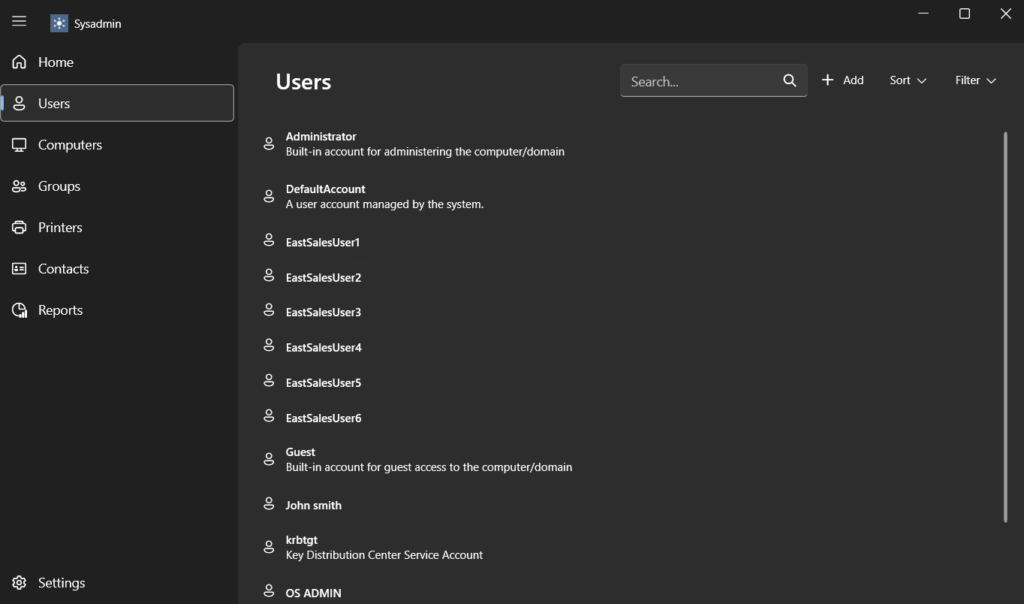
SysAdmin Anywhere web interface for Active Directory administration
Free tools carry most of the daily workload here: account lockouts, permissions snapshots, stale-account cleanup. The gap shows up when the question shifts from "what's the current state" to "prove what changed and when," which is where Netwrix Auditor picks up from its free Community Edition. Request a one-to-one demo to see the searchable audit trail against your own domain
Paid Active Directory management tools
Several products below ship a free edition alongside the licensed version rather than a trial alone, as noted where applicable.
ManageEngine ADManager Plus
ManageEngine ADManager Plus handles bulk management of user accounts and other AD objects, detailed reporting, and automation of provisioning and deprovisioning. Role-based access control supports delegation, and a built-in workflow covers ticketing.
ADManager Plus now ships a free edition instead of a trial. The free tier covers up to 100 domain objects and includes more than 200 AD reports plus user and computer management, which is enough for a small domain or a thorough evaluation. Licensed Standard and Professional editions lift the object limit and add automation.
AlbusBit AD FastReporter
AlbusBit AD FastReporter generates, stores, schedules and shares AD reports, with a large set of predefined reports and a three-step generation process.
The free edition isn't time-limited. It covers more than 250 reports across eight categories, customization across 370 fields, and multiple domain connections. Export, report storage, custom filters, automated scheduling and priority support sit in the Pro edition, which starts at $149. Teams that only need to read reports on screen can stay on the free edition indefinitely.
MaxPowerSoft Active Directory Reports
MaxPowerSoft Active Directory Reports generates reports on user accounts, group memberships, OUs and permissions, which supports both security review and compliance evidence. Administrators can identify anomalous changes, find inactive or expired accounts, check password status and review login activity, then export in several formats. Recent releases extend coverage to Entra ID alongside on-premises AD.
Two options exist below the full license. AD Reports Lite is a free edition capped at 200 objects, and the full product offers a two-week trial with unlimited objects and no credit card. Licensing is per admin user.
SolarWinds Access Rights Manager
SolarWinds Access Rights Manager (ARM) automates AD tasks across user and group management, password management, compliance and audit reporting, and Group Policy management. The product is the former 8MAN, which SolarWinds acquired and rebranded, so older reviews and documentation still use that name.
A 30-day trial includes everything in the full edition. The Full Edition, which unlocks provisioning, permission changes, workflow automation and delegation, starts at $3,448.
Adaxes
Adaxes provides unified management of Active Directory, Entra ID, Exchange and Microsoft 365 from one interface. It handles delegation of administrative rights, proactive monitoring and self-service capabilities that reduce helpdesk load, and its reporting supports compliance and audit work. Organizations running multiple AD domains or hybrid environments are the natural fit. A free trial is available.
The product is now marketed simply as Adaxes rather than Softerra Adaxes, and its documentation refers to Entra ID rather than Azure AD.
Softerra LDAP Administrator
Softerra LDAP Administrator manages LDAP directories directly, letting administrators navigate, search and modify directory entries. It supports multiple LDAP services and adds schema editing, access control management, directory synchronization, and data import and export. The vendor offers a 30-day free trial.
ENow AD Monitoring and Reporting
ENow AD Monitoring and Reporting watches an AD environment in real time from one console, identifying faults across domain controllers, DNS and replication so problems surface before users notice. There's no free edition, though a trial is available, and it sits in the broader category of Active Directory monitoring tools built for continuous infrastructure visibility rather than one-off checks.
Zohno Z-Hire and Z-Term
Zohno Z-Hire and Z-Term are single-task tools covering opposite ends of the employee lifecycle. Z-Hire automates account creation for new hires across Active Directory, Exchange and Microsoft 365, while Z-Term deprovisions accounts and removes access across connected systems when someone leaves. Both are available to trial.
CENTREL Solutions XIA Automation
CENTREL Solutions XIA Automation provisions user accounts in Active Directory, Exchange and Microsoft 365, and automates or delegates routine tasks such as bulk provisioning and password changes, including bulk provisioning from CSV. Administrators work through a web interface or mobile device, and a no-commitment trial is available.
Netwrix Access Analyzer calculates effective permissions across Active Directory and file systems in one pass, showing exactly who can reach what before an auditor asks. Request a free trial.
When free tools stop being enough
Free utilities are good at discrete jobs: finding stale accounts, unpicking lockouts, or dumping a permissions report. What they don't provide is a continuous record of what changed across the domain, alerts when something changes that shouldn't, or reports an auditor accepts without follow-up questions.
Teams usually cross that line at one of three moments. The first is an audit, when someone asks who granted an account privileged access eight months ago and nothing in the stack can answer. The second is scale, when your AD environment domain grows past the object caps on the free editions above. The third is delegation, when helpdesk staff need to perform AD tasks without holding rights that let them do anything else.
The underlying problem is that most AD damage looks like ordinary administration when it happens, which is the pattern behind the most common AD management mistakes that keep resurfacing even in environments with monitoring already in place.
How Netwrix helps with Active Directory management and security
Netwrix covers AD management and AD security with separate products rather than one catch-all tool, so the right choice depends on which job you're trying to close.
Netwrix Auditor
Netwrix Auditor records every AD and Entra ID change with before-and-after values in a searchable audit trail, agentlessly, and retains that history for long-term compliance evidence. It answers who changed what, when and where, which is the question the Community Edition leaves open, and it ships predefined reports mapped to PCI DSS, HIPAA, GDPR and other standards. Deployment takes about 30 minutes.
At Bank of Botetourt, replacing an MSSP's 200-page reports with Netwrix Auditor's risk assessment dashboard gave a small IT team clear visibility into which changes actually mattered, cutting daily security checkups from more than two hours to 20 minutes.
Netwrix Directory Manager
Netwrix Directory Manager automates group and user lifecycle management, including dynamic group membership driven by directory attributes and workflow-based self-service requests that let users join or leave groups with manager or peer approval. Delegated administration extends that further, letting group owners handle their own membership changes and password resets instead of routing every request through the domain admin account.
Netwrix Access Analyzer
Netwrix Access Analyzer calculates effective permissions across Active Directory, file systems and other data stores, resolving nested groups and inherited rights into a single view of who can reach what. It also identifies the conditions that enable excess access, including open shares, broken inheritance and directly assigned permissions.
Netwrix PingCastle
Netwrix PingCastle scores an AD domain against known attack paths and misconfigurations, producing a risk report that maps privilege-escalation routes an attacker could follow. For the 73% of teams in the Netwrix survey who weren't confident their AD is free of privilege-escalation misconfigurations, this assessment settles the question.
Netwrix Identity Recovery
Netwrix Identity Recovery restores Active Directory objects, attributes and entire domains after accidental deletion or a destructive attack, including forest recovery that would otherwise run on manual runbooks. It covers the failure case the free restore utilities don't reach.
Building the right Active Directory tool stack
Building the right Active Directory tool stack means matching each job to the product suited for it: free utilities for daily work, licensed tooling where the stakes are high enough to justify the investment.
There's no universal answer, but starting with the perpetually free editions and letting real gaps, not feature lists, decide what you license narrows the field fast.
For teams that need to prove what changed and close the visibility gaps free tools leave open, Netwrix Auditor and Netwrix PingCastle deliver a searchable change history and attack-path scoring without the weeks of deployment a full enterprise platform requires.
Request a Netwrix demo to see that change history and attack-path scoring running against your own domain, not a sample environment.
Disclaimer: Tool pricing, free-tier limits, and trial terms in this article are current as of August 2026; verify details with each vendor before you commit.
Share on
Learn More
About the author

Ian Andersen
VP of Pre Sales Engineering
Ian has over two decades of IT experience, with a focus on data and access governance. As VP of Pre Sales Engineering at Netwrix, he is responsible for ensuring smooth product deployment and identity management integration for customers worldwide, His long career has positioned him to serve the needs of organizations of all sizes, with positions that include running the security architecture team for a Fortune 100 US financial institution and providing security solutions to small and medium businesses.
Learn more on this subject
Who owns your AI agents? Probably no one
Govern the AI agent as the identity it is
Microsoft is retiring memberOf operator in Entra ID Dynamic Groups. What should administrators do next?
Powerful LDAP extended controls: Anti-remediation and invisible recon in AD
Create AD Users in Bulk and Email Their Credentials Using PowerShell